


AFFiNE
NexusAi Summary: AFFiNE is an open-source, local-first knowledge workspace that combines documents, whiteboards, databases, templates, and AI assistance for teams and individuals who want a unified alternative to fragmented wiki, planning, and visual collaboration tools.

NexusAi Overview
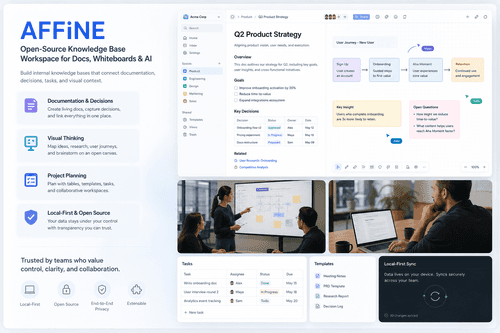
Users create workspaces where documents behave like structured blocks, whiteboards provide an open canvas, and databases keep plans or knowledge records organized. AFFiNE is designed to reduce context switching, letting teams document decisions, map ideas, and track work inside the same environment.
What AFFiNE Does
AFFiNE fits founders, product teams, engineering groups, researchers, designers, students, and operators who need one place for notes, specs, whiteboarding, planning, and internal knowledge. It is particularly useful when work moves between prose, visual reasoning, and structured records, such as product discovery, research organization, meeting documentation, project tracking, and lightweight team wikis.
- Create connected knowledge bases that combine long-form documentation, team decisions, project notes, and structured reference material in one workspace.
- Use edgeless whiteboards to sketch concepts, map relationships, plan storyboards, and collaborate visually without leaving project documentation.
- Organize work with databases and templates for trackers, planners, checklists, knowledge repositories, notes, and recurring operational workflows.
- Apply AFFiNE AI to support drafting, ideation, planning, and faster movement from rough thoughts to usable artifacts.
- Run AFFiNE across desktop, mobile, browser, and self-hosted Docker options for flexible personal or team deployment.
Where AFFiNE Is Most Useful
Technical Positioning
New users can begin with the web app or download native clients for macOS, Windows, Linux, iOS, and Android. AFFiNE also offers self-hosted Docker deployment for teams that want more control over infrastructure and data handling. The product site points users toward docs, templates, release updates, a web clipper, and community channels for support. A practical onboarding path is to start with a personal workspace, import or create core documents, add a few project databases, then use the edgeless canvas for planning and visual organization. Teams can expand from there into shared knowledge bases, internal documentation, and structured project spaces.
NexusAi: AFFiNE is most compelling for teams that want documents, canvases, databases, and AI assistance to behave as one knowledge system rather than separate productivity silos.
Getting Started
AFFiNE stands out by treating knowledge work as a blend of writing, drawing, planning, and structured organization instead of separate app categories. Its open-source posture, local-first emphasis, multi-platform availability, and AI-assisted workflows make it a strong candidate for users who want a flexible knowledge base and collaboration environment with more data control than typical cloud-only productivity suites.
Open the tool and review its core product experience.
Create your account or access your existing workspace.
Use your own task to judge speed, quality, and fit.
Check similar AI tools before making a final decision.

AFFiNE
AFFiNE is created by Toeverything, the team behind open-source productivity infrastructure including AFFiNE, BlockSuite, and related knowledge workspace components. The company focuses on building transparent, extensible tools for local-first collaboration, structured documents, visual work, and community-driven product development.
AFFiNE is a privacy-focused KnowledgeOS for writing, drawing, planning, and organizing connected information in one workspace. It merges block-based documents, edgeless whiteboards, structured databases, and AI-assisted creation so users can move from notes to diagrams to project plans without changing tools. The product is positioned as an open-source alternative to Notion and Miro, with local-first workflows for users who want more control over their data and deployment model. AFFiNE supports individual work, team knowledge bases, project documentation, visual ideation, templates, and collaborative planning across desktop, mobile, browser, and self-hosted environments. Its practical value is strongest for teams that need a flexible knowledge layer rather than a single-purpose wiki, task board, or canvas. The open development model, public codebase, and community around BlockSuite and related projects make it especially relevant for technical teams evaluating extensible productivity software.
Visit AFFiNE
Comments (0)
No Comments Found