


AI SDK
NexusAi Summary: AI SDK is Vercel’s unified TypeScript toolkit for building production AI apps and agents. It standardizes streaming, tool calls, structured outputs, and provider switching across 100+ models, with built-in fallbacks, UI hooks, and integrations with AI Gateway, Sandbox, and Workflows.

NexusAi Overview
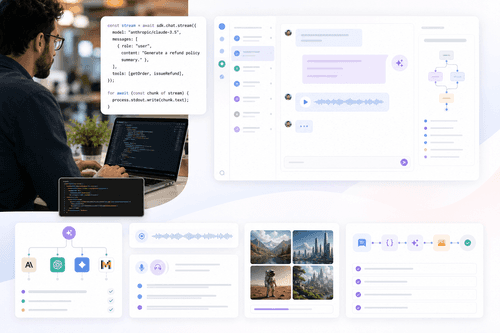
Developers install the SDK, select a model, and generate outputs through a unified API. Responses stream incrementally into UI hooks for smooth chats and generative surfaces. Providers can be swapped or routed through AI Gateway, with fallbacks and retries ensuring predictable behavior under load.
Capabilities and architecture
Ideal for product engineers, platform teams, and founders building AI-native features across web apps, internal tools, and customer-facing assistants. It fits teams standardizing on TypeScript who need portable provider choice, predictable streaming UX, and safer agent execution. Researchers prototyping multi-model agents, startups seeking reliable fallbacks at scale, and enterprises consolidating disparate model integrations benefit from one interface, consistent telemetry, and a clear upgrade path from prototype to production.
- Call text, image, speech, and video models through one unified API.
- Stream tokens and UI state with built-in event handling and retries.
- Switch providers and models with a single line, including automatic fallbacks.
- Generate structured outputs and tool calls with schema validation and repair.
- Run agents safely using sandboxed tools, resumable workflows, and message management.
Why teams choose AI SDK
What users say
Install the package and initialize a model with a few lines of TypeScript. Configure provider credentials or route calls through Vercel AI Gateway to access many models with centralized controls. Use UI hooks to stream tokens into a chat or generative component. Add automatic fallbacks and retries for resilience. For agents, register tools and run them inside Vercel Sandbox. Move long-running tasks to Workflows to survive timeouts and resume execution. Explore templates to bootstrap chatbots, Slack agents, or SQL agents, then refine in your stack.
NexusAi: AI SDK gave us streaming that just worked, provider failovers without glue code, and a clean agent API that simplified tool orchestration across services.
Getting started
AI SDK unifies the messy edges of multi-model development—streaming, provider quirks, fallbacks, and UI updates—into a coherent toolkit. Teams keep flexibility to switch providers while gaining reliability features, sandboxed execution, and resumable workflows. Combined with ready-made UI hooks and components, it shortens time-to-production for robust, user-facing AI experiences.
Open the tool and review its core product experience.
Create your account or access your existing workspace.
Use your own task to judge speed, quality, and fit.
Check similar AI tools before making a final decision.

AI SDK
Vercel builds the frontend cloud for high-performance web applications and the teams behind them. Its platform powers frameworks and tooling that emphasize developer experience, speed, and reliability. With AI Gateway, Sandbox, Workflows, and AI SDK, Vercel provides an end-to-end path for scalable AI applications.
AI SDK is a framework-agnostic TypeScript SDK for building AI applications and agents with consistent APIs, modern streaming, and multi-provider support. It abstracts provider differences, enabling developers to call text, image, speech, and video models through one interface while routing via Vercel AI Gateway for access to 100+ models. The SDK’s Core layer covers text generation, structured object outputs, tool calling, error handling, and agent building. Its UI layer provides hooks for responsive chat and generative experiences without custom event plumbing. Reliability features—automatic fallbacks, retries, and tool-call repair—promote stable behavior in production. Complementary components include Vercel Sandbox for running agent-executed code safely, Workflows for long-running, resumable tasks, and AI Elements for ready-to-use UI components. The result is a pragmatic, portable stack that accelerates shipping resilient AI features.
Visit AI SDK
Comments (0)
No Comments Found