


ChatGPT Images 2.5
NexusAi Summary: OpenAI’s ChatGPT Images 2.5 is a state‑of‑the‑art image model and product experience combining faster generation, sharper fidelity, and precise, multi‑turn editing. It adds Sketch, templates, comments, and shareable prompts, plus two API models—Flare and Sunburst—for reference‑led creative pipelines.

NexusAi Overview
Create with a prompt, add reference photos, or sketch layout directly in ChatGPT. Generate, then refine with targeted instructions or region edits across multiple turns. Capture feedback in comments and share prompts. Teams can transition outputs to API‑driven pipelines for automated variations, product updates, and brand‑safe localization.
What’s New in Images 2.5
Images 2.5 suits designers, marketers, ecommerce teams, social creators, product managers, and agencies who need consistent, on‑brand visuals. It’s also valuable to UX and presentation teams building structured layouts or transparent assets, and to developers embedding generation into content platforms, retail catalogs, or media tooling. If your workflow requires precise edits, subject fidelity, and reliable multi‑turn refinement rather than one‑off eye‑candy, this release fits.
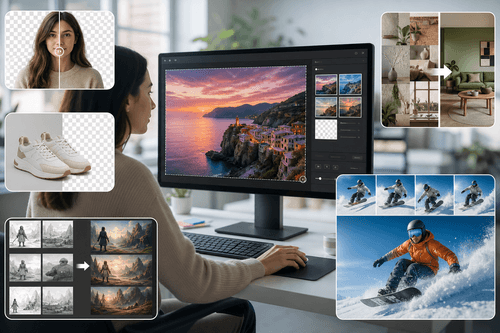
- Delivers sharper details, natural lighting, and richer textures from prompts or references.
- Preserves subjects and composition while editing only requested regions across scenes.
- Maintains edit consistency over multiple turns without degrading overall image quality.
- Supports transparent backgrounds and complex layouts for production-ready creative assets.
- Cuts generation latency up to fifty percent compared with Images 2.0.
Why It Stands Out
Who It’s For
In ChatGPT, start by selecting Images and typing @Sketch to draw a guide, or pick a template like poster or product photo. Attach references, describe style and constraints, then iterate with targeted instructions; comments document context for collaborators. For backends, integrate the Images API via OpenAI SDKs or REST, choose GPT‑Image‑2.5 Flare or Sunburst, and pass prompts, reference images, and optional masks for localized edits or transparent output. Authenticate with your API key, set latency or quality preferences by model, and stream results into asset managers or design systems.
NexusAi: Make precise, on‑brand images faster—without losing the character of your originals.
Getting Started
Compared with Images 2.0, 2.5 pairs meaningfully lower latency with stronger subject preservation, tighter edit control, and session‑level consistency. The ChatGPT experience—Sketch, templates, comments, and prompt sharing—shortens the path from idea to usable asset. For production, dual models balance speed and precision, while C2PA metadata and invisible watermarking support responsible distribution.
Open the tool and review its core product experience.
Create your account or access your existing workspace.
Use your own task to judge speed, quality, and fit.
Check similar AI tools before making a final decision.
ChatGPT Images 2.5
OpenAI builds general‑purpose AI systems and developer platforms used by individuals and enterprises worldwide. Its research and product teams focus on scalable alignment, safety, and practical usefulness. The company maintains widely adopted APIs across text, vision, and multimodal workflows, powering consumer apps and production integrations across industries.
ChatGPT Images 2.5 is OpenAI’s new image system available in ChatGPT and the Images API. It improves realism and control with sharper detail, more natural lighting and textures, and stronger subject preservation from reference photos. Precision editing targets only what you specify, while multi‑turn consistency keeps prior changes intact across iterations. Latency is reduced by up to 50% versus Images 2.0, enabling faster concepting and on‑brand refinement. In ChatGPT, new tools—Sketch for drawing guidance, templates for common formats, image comments, and prompt sharing—make collaboration and handoff straightforward. For developers, GPT‑Image‑2.5 Flare brings the quality and speed needed for most apps, while Sunburst adds extra precision for premium creative work that tolerates longer generation times. Safety features include prompt and image checks, C2PA metadata, and invisible watermarking. Outputs better match style directions and complex layouts, including transparent backgrounds.
Visit ChatGPT Images 2.5
Comments (0)
No Comments Found