


Immich
NexusAi Summary: Immich is an open-source, self-hosted photo and video backup platform with native Android and iOS apps, a modern web interface, and a stable server. It centralizes capture, organization, and sharing while keeping storage, access policies, and data residency under your control.

NexusAi Overview
Immich runs a server you operate; the mobile apps send originals and metadata as they are captured, and the web interface unifies review, organization, and sharing. Combined with published docs and an API, teams can script imports, automate verification, and maintain a single, consistent library.
What It Does
Immich suits privacy-conscious households, small organizations, schools, and field teams that capture media on mobile devices and need dependable, centralized backup without vendor lock-in. It also fits researchers and archivists who require predictable retention and auditability. Engineers and operators benefit from the API and documentation for scripted imports, policy enforcement, and integration with existing monitoring or storage workflows. For buyers evaluating risk, the open roadmap and active community reduce uncertainty and ease long-term planning.
- Back up photos and videos from Android and iOS automatically to your own server, preserving originals, metadata, and albums without relying on third-party cloud providers.
- Use a fast web interface to browse timelines, manage albums, search, and review uploads, keeping a single, coherent library across devices and household members.
- Control storage location, quotas, and retention policies on the server, aligning photo governance with company, family, or research project requirements and regional data residency constraints.
- Integrate with the Immich API to automate imports, trigger organized uploads from other systems, and build workflows for curation, review, and downstream archival or publishing pipelines.
- Leverage community resources, official documentation, datasets, and roadmap updates to plan migrations, validate performance, and standardize backup practices for mobile capture at scale.
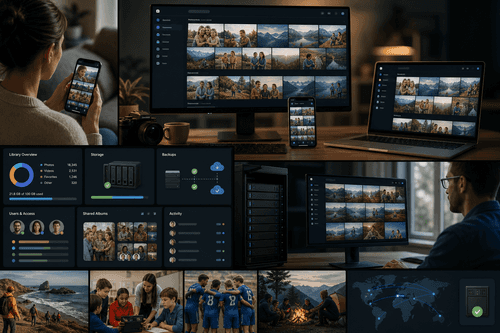
Highlights
Who It’s For
Start by deploying the Immich server using the documentation—most users choose a Docker-based setup on a home lab, VPS, or existing Linux host. After the server is reachable, sign in on the web, create users as needed, and point the Android and iOS apps to your server URL to enable automatic backup. Explore the API and examples to script imports or validate uploads, and review the roadmap to anticipate changes. For production use, set up backups for the server storage and apply your preferred reverse proxy, authentication, and monitoring practices.
NexusAi: Own your photo library end to end—mobile capture, reliable backup, and a modern web experience—without surrendering control to someone else’s cloud.
Getting Started
Immich delivers a practical, ownership-first alternative to consumer photo clouds: native mobile capture, a fast browser experience, and a documented server and API. It fits households and small teams that need dependable backups, clear access boundaries, and long-term portability. With transparent documentation and an open roadmap, it reduces operational risk and makes it easier to standardize processes around retention, restore, and governance.
Open the tool and review its core product experience.
Create your account or access your existing workspace.
Use your own task to judge speed, quality, and fit.
Check similar AI tools before making a final decision.

Immich
Immich is developed by the Immich open-source project with support from FUTO. The team focuses on privacy, portability, and reliable mobile-to-server backup. They publish documentation, an API, datasets, and a public roadmap to help operators evaluate, deploy, and automate the platform.
Immich is a self-hosted photo and video backup platform that replaces siloed cloud galleries with a private, portable library you control. Native Android and iOS apps capture and back up media to a server you operate, while a responsive web interface handles browsing, album management, and sharing. The project publishes documentation, an HTTP API, datasets, and a public roadmap, making it straightforward to automate ingestion, standardize backup practices, and plan deployments. Designed for ownership and longevity, Immich decouples your memories and media operations from third-party providers, supporting personal libraries, teams, and research repositories. With predictable performance and flexible storage options, it scales from a home server to small organizations, and integrates cleanly into existing infrastructure and policies. Administrators can define retention expectations and access boundaries on the server, ensuring compliant handling of media alongside clear operational ownership and straightforward restore paths.
Visit Immich
Comments (0)
No Comments Found