


LogoFast
NexusAi Summary: LogoFast is a no‑friction logo builder for quick, clean marks. Start from Lucide icons, adjust size, stroke, rotation, fill, and background, then download a sharp logo for apps, MVPs, and micro‑SaaS without opening heavyweight design tools.

NexusAi Overview
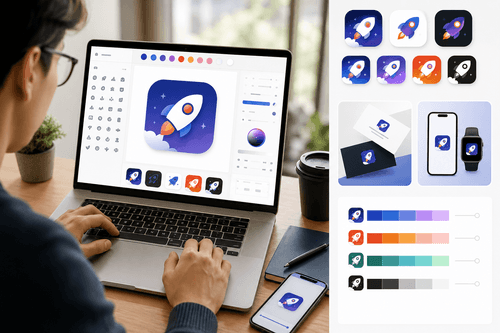
Open the app, search or browse an icon, set canvas size, and tune stroke, rotation, background, and fills with immediate visual feedback. Iterate via presets, test contrast and legibility on dark/light, then download the finished mark for use across product surfaces.
Capabilities
LogoFast suits indie makers, small teams, hackathon projects, internal tools, and early MVPs that need a recognizable mark fast. Engineers and operators who prefer shipping over fiddling can land on a serviceable identity, then evolve later with a designer. It’s also handy for experiments—naming tests, storefront mockups, and documentation—where a clean, neutral logo keeps attention on the concept.
- Pick from Lucide icons to start a clean, recognizable logo mark.
- Adjust size, rotation, and stroke width with precise, responsive sliders.
- Set background, border, fill colors, and opacity for instant visual contrast.
- Apply presets to compare styles quickly and keep explorations consistent across assets.
- Download a high‑resolution logo ready for apps, landing pages, and storefronts.
Why it matters
What users say
Visit the site and begin in the editor—no installs or setup required. Pick an icon from the library, set size, rotation, and border width, then choose background, border, and fill colors with opacity control. Use presets to compare styles, verify legibility on light and dark, and adjust until the canvas preview looks right. When satisfied, download your logo for immediate use across your product surfaces. Helpful tip: start from a single color family and a consistent stroke‑to‑size ratio to maintain coherence across assets.
NexusAi: A focused, icon‑first logo builder that trades options for speed, producing readable marks quickly.
Getting started
LogoFast stands out by narrowing scope to the decisions that define a clear mark: glyph selection, stroke, color, contrast, and scale. The Lucide foundation keeps shapes consistent; presets keep iterations fast. For early‑stage teams, it’s a pragmatic bridge—strong enough to brand an MVP today, simple enough to replace later without sunk‑cost regret.
Open the tool and review its core product experience.
Create your account or access your existing workspace.
Use your own task to judge speed, quality, and fit.
Check similar AI tools before making a final decision.

LogoFast
LogoFast is created by Marc Lou, an indie maker known for practical, fast‑to‑ship web tools and the CodeFast learning program. His projects focus on reducing friction for founders and developers, emphasizing simple interfaces, useful defaults, and outputs that help ship real products sooner.
LogoFast is a lightweight web tool for generating simple, readable logos in minutes. Built around the Lucide icon set, it lets you start from a well‑crafted glyph and refine essentials—size, rotation, border width, border color, fill color, opacity, and background—using direct, responsive controls. A live canvas preview reflects every change immediately, so you can iterate through ideas rapidly without complex timelines or layers. Presets help you test coherent styles quickly, compare alternatives, and standardize outputs across screens and use cases. When the mark looks right, download it straight from the browser. LogoFast targets the early branding gap: founders, developers, and indie makers often need a crisp placeholder identity long before a full design engagement. By focusing on icon‑first composition and a minimal control set, it avoids decision bloat while still yielding professional, legible results for app tiles, nav bars, landing pages, and store listings.
Visit LogoFast
Comments (0)
No Comments Found