


Power Automate
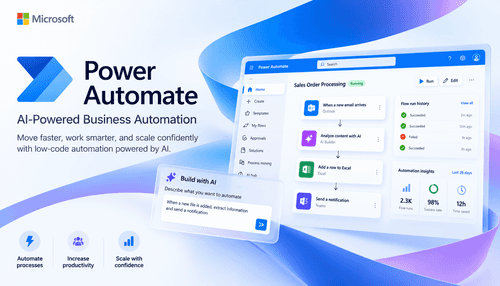
NexusAi Summary: Power Automate is Microsoft’s low‑code automation platform combining cloud flows, desktop RPA, and process mining. It connects to 1,000+ services, embeds Copilot for natural‑language authoring, and scales with enterprise governance to streamline approvals, document processing, and data synchronization.
NexusAi Overview
Typical workflow: identify a repetitive task, capture or design a flow using templates or Copilot, connect services through triggers and actions, and orchestrate approvals, data movement, or document processing. Process mining surfaces bottlenecks, while run history and dashboards verify reliability and quantify impact.
What it does
Power Automate suits operations, finance, supply chain, HR, sales operations, and service teams reducing manual effort and latency. IT and Centers of Excellence standardize environments, policies, and reusable components for citizen developers. Enterprises modernizing SAP procurement, invoice processing, case management, or onboarding can bridge legacy UIs, APIs, and Microsoft 365 without bespoke middleware.
- Design flows with Copilot using natural language, then refine through visual steps.
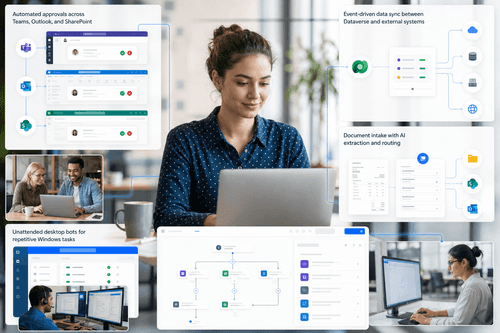
- Automate legacy desktops via attended or unattended RPA with resilient selectors.
- Connect cloud and on‑premises systems using 1,000+ prebuilt and custom connectors.
- Discover bottlenecks with process and task mining, prioritize opportunities, track ROI.
- Govern at scale with Managed Environments, DLP policies, and centralized monitoring.
Highlights
Why choose Power Automate
Begin with a free trial and sign in using your work account. Create a Managed Environment, apply DLP policies, and connect Dataverse if needed. Install Power Automate for desktop on Windows 10 or 11 to build attended or unattended RPA; configure the on‑premises data gateway to reach internal systems. Explore templates for approvals, file sync, and notifications, then author flows with Copilot and refine in the visual designer. Validate with run history, error handling, and solution packaging. Use process or task mining to ingest logs, analyze bottlenecks, and prioritize rollouts.
NexusAi: Automate across cloud and desktop with built‑in governance, connectors, and AI.
Getting started
Power Automate stands out by unifying DPA, desktop RPA, and process mining with Copilot-assisted authoring and deep Microsoft 365 integration. Over 1,000 connectors, hosted RPA, and enterprise governance reduce implementation friction while improving reliability. It’s a pragmatic route to automate across APIs and legacy UIs without rebuilding systems.
Open the tool and review its core product experience.
Create your account or access your existing workspace.
Use your own task to judge speed, quality, and fit.
Check similar AI tools before making a final decision.

Power Automate
Microsoft develops the Power Platform, Azure, and Microsoft 365. Power Automate leverages Microsoft’s cloud, identity, and security investments to deliver scalable low‑code automation. The company supports global compliance, extensive connector ecosystems, and enterprise‑grade governance, helping organizations modernize processes while integrating with existing systems and data.
Power Automate delivers end‑to‑end workflow automation across cloud and desktop. Digital process automation orchestrates APIs, SaaS, and on‑premises data via 1,000+ connectors, while robotic process automation records and replays UI actions for legacy systems using attended or unattended bots, including hosted capacity that elastically scales. Built‑in process and task mining analyze event data to map processes, prioritize opportunities, and track ROI. Copilot accelerates authoring and iteration in natural language, recommends optimizations, and applies AI models for document classification, extraction, and image understanding. Deep Microsoft 365, Teams, SharePoint, Excel, Power BI, and Dataverse integration reduces context switching and grounds automations in governed data. Managed Environments, data loss prevention, role‑based access, and centralized monitoring provide control, compliance, and reliability at scale. The result is a unified platform to discover, automate, and continuously improve business processes.
Visit Power Automate
Comments (0)
No Comments Found