


REA
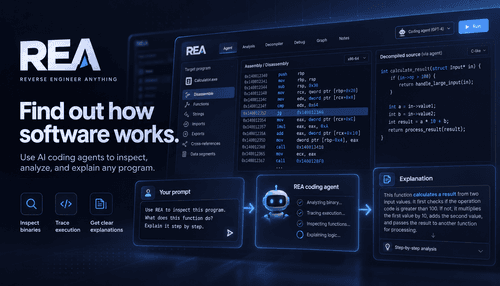
NexusAi Summary: REA inspects executables, browser scripts, and Electron apps so your coding agent can explain, reproduce, and rebuild software behaviour from binaries to runtime traces, including handlers, branches, and call relationships.
NexusAi Overview
Workflows start with a targeted inspection: point REA at an executable, an Electron app or a browser endpoint and capture the code paths and runtime values that matter. The agent receives labelled snippets and traces, then answers in human terms and produces reconstruction code or tests.
Capabilities and outputs
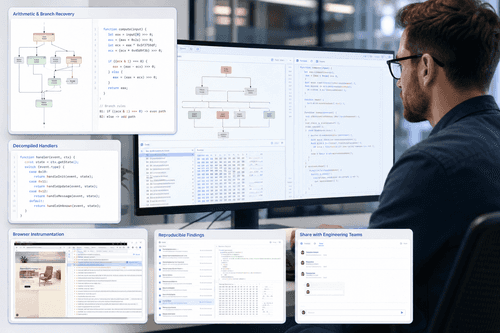
The toolkit suits engineers, security researchers, product teams and AI-first developers who need to understand legacy behaviour or closed binaries quickly. Typical scenarios include rebuilding a calculator rule, extracting a game’s acceleration formula, tracing an unexpected UI handler, or verifying a patch. REA reduces time spent decoding assembly and chasing call graphs by delivering labelled findings that integrate into an agent-driven development loop.
- Inspect native binaries and return selected assembly and called helpers.
- Map JavaScript and Electron modules to reveal runtime flow and IPC.
- Trace browser activity and capture live script updates and configuration.
- Produce readable handler summaries and short reconstruction-ready code snippets.
- Validate reconstructions with simple checks that reproduce observed results.
Practical reverse engineering for agent-driven development
Who it’s for
Install the agent connector and follow the guided setup; the recommended starter command is npx rea-agents@latest setup. The process returns a setup plan for approval and then verifies the installation. For browser inspection, open a local debugging endpoint and give the agent the target page URL. Documentation and example labs show end-to-end cases such as Calculator and the dinosaur game to illustrate inspection, rule recovery and reconstruction.
NexusAi: REA turns low-level traces into actionable code and concise explanations your agent can use immediately.
Getting started
REA’s strength is pragmatic output: concise, agent-friendly findings that reduce friction between low-level traces and working prototypes. It avoids exhaustive dumps in favour of labelled handlers, operand mapping and simple checks, letting teams reproduce behaviour and iterate rapidly without deep manual decoding.
Open the tool and review its core product experience.
Create your account or access your existing workspace.
Use your own task to judge speed, quality, and fit.
Check similar AI tools before making a final decision.

REA
Rea Tools is a small engineering team focused on making reverse engineering accessible to developer workflows. They blend lightweight inspection tooling with agent integrations and community-supported examples.
REA (Reverse Engineer Anything) is an analysis toolkit that connects with coding agents to inspect native binaries, Electron applications and browser runtime activity. It extracts instruction sequences, decompiled handlers, call relationships and runtime values, then surfaces concise rules your agent can use to explain behaviour or reconstruct logic. The product targets practical reverse-engineering workflows: identify branches, recover calculation rules, trace helpers and reproduce unit checks. Integration is lightweight: a local agent plugin plus an inspector that captures live pages and installed libraries. Outputs are designed for reproducibility, with selected assembly, decompiled code and test checks that an engineer can run or adapt. REA emphasises readable findings and agent-friendly prompts rather than raw data dumps, so teams can iterate from discovery to a working prototype quickly.
Visit REA
Comments (0)
No Comments Found