


Screen Studio
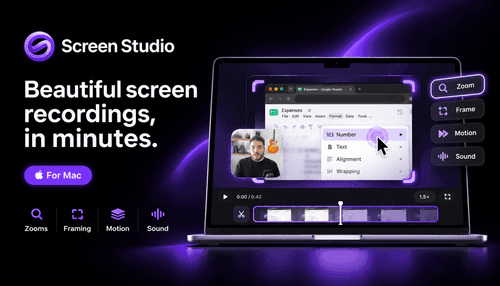
NexusAi Summary: Screen Studio is a macOS-first screen recorder that automates zooms, framing, captions, and local audio processing to produce polished demos and tutorials without manual post-production.
NexusAi Overview
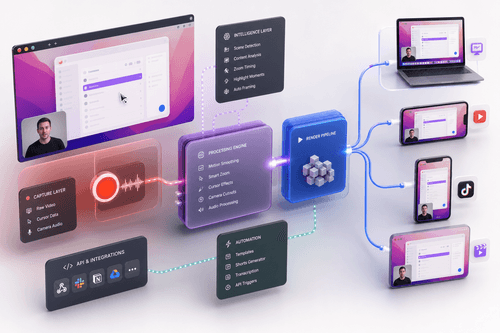
Record once and repurpose across formats: Screen Studio captures raw video with synchronized cursor data, then reconstructs the final frames with smooth motion, smart zooms, and optional webcam cutouts so every export reads like a directed shoot rather than a raw capture.
Capabilities and workflow
Practically this means you can record lectures, product demos, or mobile app walkthroughs with consistent window sizes, then switch aspect ratios without re-recording. Layouts (split screen, camera overlay, fullscreen camera, camera cutout) animate automatically and captions adapt their position and style per aspect ratio. Device recordings import directly over USB and are framed in the correct device bezel for app demos.
- Records screen pixels while separately logging precise cursor and interaction metadata.
- Applies automatic or manual animated zooms that preserve cursor visibility and context.
- Edits by transcript: delete sentences to cut video without scrubbing the timeline.
- Processes audio and captions locally, keeping voice data on the user’s Mac.
- Exports shareable browser links, editable project bundles, and high-quality MP4 videos.
Core strengths
Who should evaluate Screen Studio
Install from the macOS download and grant screen and camera permissions; macOS 13.1 or later is recommended. Recording uses ScreenCaptureKit, so performance and window resizing remain smooth. On first use you can opt into usage analytics and cloud features; all uploads require explicit consent. Device recording works over USB with no additional installs. Documentation and a short guided tour appear inside the app to explain transcript editing, export presets, and shareable links.
NexusAi: Makes screen demos feel directed — the app automates the parts you would normally spend hours fixing.
Getting started
Screen Studio condenses many manual post-production steps into automatic, deterministic operations tied to recorded metadata. Its attention to local processing, repeatable exports across aspect ratios, and clear privacy controls make it a pragmatic choice for engineers, educators, and product teams who need reliable, high-quality screen content without complex export pipelines.
Open the tool and review its core product experience.
Create your account or access your existing workspace.
Use your own task to judge speed, quality, and fit.
Check similar AI tools before making a final decision.

Screen Studio
Adam Pietrasiak and his team build focused macOS tools that prioritize design, performance, and privacy. Screen Studio targets creators and product teams who need reproducible, high-quality screen content with local processing and minimal manual polishing.
Screen Studio records macOS displays with metadata-driven cursor captures and applies effects after the take, enabling precise cursor smoothing, automatic and manual zooms, and layout transitions. Built on ScreenCaptureKit and optimized for Apple silicon, it runs most transcription, noise reduction, face tracking, and upscaling locally. Outputs include link-based web previews and high-quality MP4 exports up to 4K60, plus device mockups for iPhone and iPad recordings. Cloud features are optional and explicitly consented to; most workflows remain entirely offline. The product targets creators who need repeatable, high-fidelity screen demos with minimal editing overhead.
Visit Screen Studio
Comments (0)
No Comments Found