


Taste Skill
NexusAi Summary: Open-source SKILL.md framework that steers coding agents to ship non‑generic frontends. Taste Skill v2 reads briefs, infers design direction, maps to established design systems, enforces dark‑mode parity, and applies strict pre‑flight checks across Cursor, Claude Code, Codex, Gemini CLI, v0, Lovable, and more.

NexusAi Overview
Install the skill, point your agent at the brief, and generate. The framework infers audience and layout family, maps to a suitable system, builds coherent blocks, checks dark‑mode and hierarchy parity, and runs a hard pre‑flight so agents don’t deliver placeholders, skipped sections, or mismatched components.
What v2 Delivers
Taste Skill is for engineers and agents owners who want non‑cookie‑cutter UI without hiring a design team. Ideal users include full‑stack developers, frontend leads, AI agent integrators, design‑system maintainers, and product engineers shipping internal consoles or public sites. It also suits auditors modernizing legacy apps that cannot adopt a heavy framework but need coherent tokens, components, and dark‑mode parity today.
- Reads briefs to infer audience, layout family, motion depth, and design direction.
- Maps requirements to Material, Fluent, Carbon, Polaris, Primer, or native CSS.
- Enforces dual‑theme parity with consistent contrast, hierarchy, rhythm, and tokens.
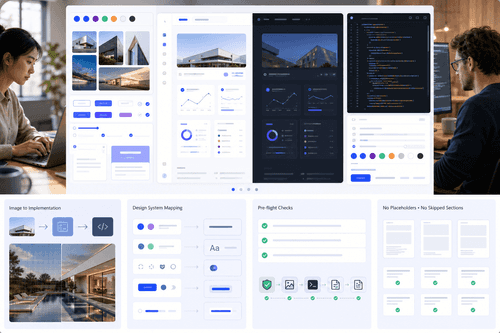
- Runs a strict pre‑flight checklist that blocks placeholders and incomplete sections.
- Offers style, execution, image‑first, Stitch export, and redesign audit skills.
Current Skill Packs
Who Uses It
Install via the skills CLI and select the default design‑taste‑frontend skill. For pinned legacy behavior, use design‑taste‑frontend‑v1. Pair the framework with your agent (Cursor, Claude Code, Codex, Gemini CLI, v0, Lovable, OpenCode) and supply a concise brief and constraints. For image‑driven work, start with image‑to‑code‑skill; for audits, use redesign‑skill; for completeness guarantees, enable output‑skill. Run generation, review the hard pre‑flight checklist, and iterate by extending the block library schema. Dual‑theme checks run automatically so dark and light modes ship together.
NexusAi: Less slop, designs pop—opinionated guardrails that make agents ship real UI.
Getting Started
Taste Skill replaces vague prompts with enforceable taste and structure for agent frontends. By centering the brief, mapping to proven systems, and gating outputs with a hard checklist, it delivers interfaces that look intentional, not generated. Style packs, image‑first workflows, Stitch export, and an audit‑first path cover varied projects without locking teams to a single library or runtime. Results stay consistent across iterations and themes.
Open the tool and review its core product experience.
Create your account or access your existing workspace.
Use your own task to judge speed, quality, and fit.
Check similar AI tools before making a final decision.

Taste Skill
Taste Skill is built by Leon Lin with contributions from blueemi and the open‑source community. The project focuses on making agent‑generated frontends production‑grade through strong design taste, rigorous checklists, and pragmatic system mapping, supported by individual sponsors and open‑source program partners.
Taste Skill is an open-source anti‑slop frontend framework for AI coding agents. Instead of templated scaffolds, it ships opinionated SKILL.md rules that guide tools like Cursor, Claude Code, Codex, Gemini CLI, v0, Lovable, and OpenCode to interpret a brief, choose a fitting design language, and implement it consistently. The v2 default emphasizes brief inference, design‑system selection (Material, Fluent, Carbon, Polaris, Primer, GOV.UK, USWDS, Bootstrap, Radix, shadcn, or native CSS), dual‑theme parity, and an audit‑first protocol for redesigns. A strict pre‑flight checklist blocks incomplete outputs. Specialized skills cover image‑first flows, visual styles (minimalist, soft, brutalist), execution guarantees, Google Stitch export, and premium web or mobile reference image generation. The project is open source and focused on practical, reproducible results: less slop, stronger hierarchy, dependable motion, and coherent component libraries across iterations. Works with any agent that supports SKILL.md directives.
Visit Taste Skill
Comments (0)
No Comments Found