


ThreeUI
NexusAi Summary: ThreeUI is a curated library of reusable Three.js components and interactive GLSL shader examples. It helps teams prototype and ship WebGL experiences faster with well-documented scene primitives, configurable materials, effect utilities, and copyable, production‑oriented code snippets.

NexusAi Overview
Start by browsing the component catalog or shader gallery, open an example, tweak parameters, and observe the live preview. Review the notes to understand tradeoffs, then copy the minimal snippet to your project and adapt material, lighting, and camera settings for your scene.
Components, Materials, and Shader Building Blocks
ThreeUI is designed for front‑end engineers, creative coders, technical artists, and educators who prefer explicit Three.js control without a framework commitment. It suits teams building marketing microsites, product viewers, data visualizations, and lightweight interactive scenes where fast iteration and predictable results matter. Studios and startups can standardize on consistent patterns, while newcomers gain an approachable path to understanding materials, lighting, effects, and shader composition without wading through sprawling, undirected examples.
- Browse reusable Three.js scene primitives with practical defaults and sensible parameters.
- Experiment with interactive GLSL shaders and visualize changes in real time.
- Copy production-ready code snippets to accelerate prototyping and delivery timelines.
- Combine materials, lights, and effects to craft polished WebGL micro-experiences.
- Reference concise documentation that explains parameters, tradeoffs, and common pitfalls.
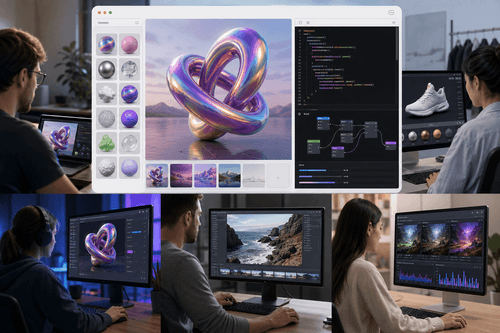
Highlights
Who Uses ThreeUI
Visit the browse page to explore components or shaders, then open any example to see a live preview. Adjust controls to understand parameters, read the usage notes, and copy the minimal snippet into your Three.js project. Each page highlights required dependencies and the smallest working setup, helping you integrate with existing renderers, asset loaders, and event loops. Start with a single component or shader, validate on target devices, and expand incrementally—tuning materials, post‑processing, and camera controls as you go. Keep the example open for reference as you adapt settings to your scene’s lighting, scale, and performance envelope.
NexusAi: Build polished WebGL scenes in hours, not weeks.
Getting Started
By focusing on production‑minded examples rather than glossy demos, ThreeUI reduces uncertainty around renderer setup, color management, and effect ordering. The combination of reusable components, interactive shader exploration, and copyable code shortens prototyping loops and improves handoff quality. Teams keep full control over architecture and dependencies while adopting proven, minimal patterns for materials, lighting, and post‑processing that translate cleanly into real projects.
Open the tool and review its core product experience.
Create your account or access your existing workspace.
Use your own task to judge speed, quality, and fit.
Check similar AI tools before making a final decision.

ThreeUI
ThreeUI is maintained by practitioners who build for the modern web graphics stack. The project emphasizes pragmatic Three.js patterns, small composable pieces, and clear teaching examples. The focus is to help engineers deliver interactive visuals reliably, with code that remains understandable months later.
ThreeUI is a focused resource for building modern web graphics with Three.js. It combines a curated catalog of reusable scene components with an interactive gallery of GLSL shaders. Each example favors practical defaults, concise code, and clear documentation, so engineers can move from idea to working prototype quickly. The library concentrates on common building blocks—cameras, lights, materials, loaders, controls, and post‑processing utilities—presented with minimal boilerplate and production‑minded patterns. Interactive shader examples demonstrate how parameters impact look, performance, and readability, reducing trial‑and‑error. By packaging working snippets that integrate cleanly with vanilla Three.js projects, ThreeUI helps teams ship reliable WebGL experiences faster, with less guesswork and fewer rendering surprises. It targets engineers who value composability and explicit control, surfacing the essential pieces required for scenes, materials, and effects while avoiding framework lock‑in, heavy abstractions, or assumptions about build tooling and application architecture.
Visit ThreeUI
Comments (0)
No Comments Found