


VIOLOOP
NexusAi Summary: Violoop is a plug-in, screen-aware AI computer that connects via HDMI and USB-HID to automate real desktop workflows across Windows, macOS, and Linux. It runs an on-device 8B model, protects privacy, and requires physical approval before execution.

NexusAi Overview
Connect Violoop via HDMI and USB. It captures the desktop video feed, interprets context on-device, proposes the next action beside your cursor, and waits. With your approval, it executes keystrokes and clicks through a hardened HID path—no drivers, no plugins.
What it automates and how it operates
Violoop suits operators, founders, analysts, marketers, support teams, and developers who move between email, docs, sheets, CRM, browsers, consoles, and design tools. It drafts replies, files artifacts, updates records, reconciles spreadsheets, runs scripted steps, and coordinates cross‑app workflows without demanding integrations. Teams needing strict privacy benefit from local video processing, on-device memory, and hardware-gated execution. Solo users gain speed without learning prompts or syntax—Tab to accept, press to approve.
- Captures 4K HDMI input and interprets on-device without uploading raw pixels.
- Executes keystrokes and clicks via a secure USB‑HID path you approve.
- Delivers instant screen-aware suggestions with no prompts or chat windows.
- Runs long cross‑app workflows, avoiding fragile integrations or custom plugins.
- Uses your Claude, OpenAI, or Gemini key for heavyweight reasoning only.
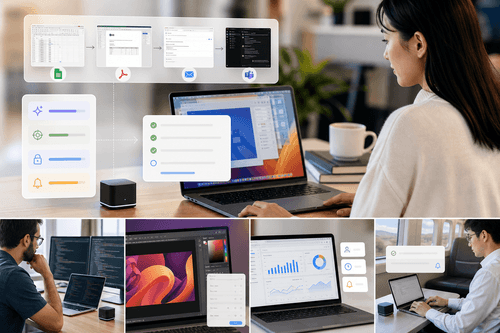
Why Violoop is different
Security and performance designed into the hardware
Place Violoop inline between your computer and monitor via HDMI and connect USB or Type‑C. It enumerates as a standard keyboard and mouse—no drivers or system modifications. Pair the phone or desktop companion over Wi‑Fi, sign in, and add your own API keys for Claude, OpenAI, or Gemini if you want cloud reasoning. Start with instant suggestions, then graduate to long‑running workflows and away mode. All learned patterns and task history stay local by default; outbound calls use filtered text summaries only. Dual‑monitor support and an on-device AMOLED touchscreen provide flexible setups.
NexusAi: Screen-aware automation that only acts when you press the key.
Getting started and deployment path
Violoop is a computer that safely runs your computer. Unlike chat-first tools or API-bound automations, it reads pixels locally, chooses deterministic control paths, and gates actions in hardware. Users get instant suggestions, reliable cross‑app execution, and lower token spend—without surrendering raw screens or installing brittle integrations. For teams standardizing agent workflows with real security guardrails, it’s a practical path to production.
Open the tool and review its core product experience.
Create your account or access your existing workspace.
Use your own task to judge speed, quality, and fit.
Check similar AI tools before making a final decision.

VIOLOOP
BVIO Technology Limited builds local-first AI systems that integrate with real computers through video capture and secure HID control. The team focuses on reliable, privacy-preserving agent execution with hardware-level safety, efficient on-device models, and pragmatic integration across everyday desktop software.
Violoop is screen-aware AI hardware that turns any PC into an agent-ready workstation. Insert it between your machine and display via HDMI, and it reads pixels locally, prepares the next step, and drives input through a secure USB‑HID path. A dedicated AI accelerator (26 TOPS) and RK3576 octa‑core SoC run an 8B model on-device; raw video never leaves the desk. When larger reasoning is needed, Violoop can send a filtered text summary using your own Claude, OpenAI, or Gemini key. Dual-chip isolation and a physical confirmation key gate actions in hardware, so nothing executes without you. It supports instant screen-aware suggestions, long-running cross‑app tasks, and away mode with phone notifications. Trained across common desktop apps, Violoop avoids fragile integrations by operating directly from what’s on screen.
Visit VIOLOOP
Comments (0)
No Comments Found