


Willow Voice
NexusAi Summary: Willow Voice is a cross-platform dictation and AI keyboard that turns natural speech into clean, formatted text across Mac, Windows, and iPhone. It prioritizes speed, accuracy, privacy, and style matching to accelerate everyday writing in any app.

NexusAi Overview
Place the cursor in any text field, press a hotkey, and speak normally. Willow handles punctuation, formatting, and filler removal, then inserts finished text exactly where you were typing. No app switching, no paste buffer, and no prompts to engineer mid‑flow.
How Willow turns voice into finished writing
Willow suits professionals who write constantly but don’t want to slow down: executives and founders handling email volume, sales and success teams managing replies, developers documenting issues, operators drafting updates, lawyers and healthcare staff needing accurate transcriptions, and students taking notes. It’s equally useful for power users who live in Slack, Gmail, Notion, or IDEs and want a faster, less fatiguing way to produce high-quality text.
- Dictate anywhere your cursor works, across email, docs, chat, and terminals.
- Press a hotkey, speak naturally, and receive correctly punctuated, formatted text.
- Learns your style over time, matching tone across Slack, Gmail, and documents.
- Remembers names, product terms, and abbreviations with an auto-learning personal dictionary.
- Works offline with privacy safeguards, SOC 2 and HIPAA compliance for sensitive workflows.
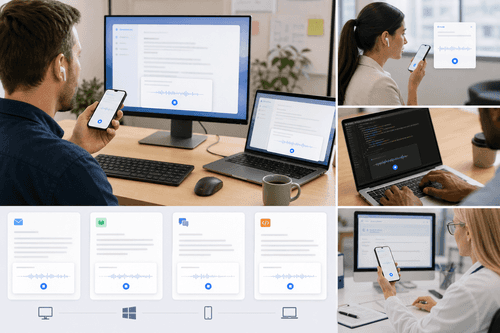
Where Willow excels
Who it’s for
Download the desktop app for Mac or Windows and the iPhone app to keep dictation consistent across devices. Choose a global hotkey, grant microphone permissions, and start dictating anywhere you can type. Add frequently used phrases as shortcuts and let the dictionary learn names and jargon automatically over time. For regulated environments, enable offline mode and review security guidance. The workflow requires no new editor or browser extension—your text appears exactly where your cursor is.
NexusAi: “For decades I've wanted to just talk to my computer and have it work. Willow is the first time it actually did and it's delightful.” — Alexis Ohanian, Founder of Reddit
Setup and onboarding
Willow replaces the keyboard for high-volume, everyday writing without changing the tools you already use. Its combination of speed, accuracy, style adaptation, cross-device coverage, and strong privacy makes it a dependable upgrade for email, chat, documentation, and notes—especially when work demands both pace and polish.
Open the tool and review its core product experience.
Create your account or access your existing workspace.
Use your own task to judge speed, quality, and fit.
Check similar AI tools before making a final decision.

Willow Voice
Willow Care, Inc. builds voice-first productivity software for professionals and teams. The company focuses on speed, accuracy, and privacy, delivering cross-platform dictation and AI writing with enterprise-grade security, including SOC 2 Type II controls, HIPAA support, and zero data retention.
Willow Voice is a voice-first writing tool that converts natural speech into clean, formatted text inside any app on Mac, Windows, and iPhone. It pairs low-latency, high-accuracy dictation—often displaying text in ~200 ms—with Willow Scribe, which turns rough speech into polished writing in your tone. Smart formatting removes filler and fixes punctuation automatically; style-matching adapts to email, chat, and long-form docs; and an auto-learning dictionary remembers names, acronyms, and product terms. Shortcuts let you insert saved phrases instantly. With support for 100+ languages, whisper-tolerant capture in noisy offices, and an offline mode powered on-device, Willow meets real-world constraints. Enterprise security includes end-to-end encryption, zero data retention, SOC 2 Type II controls, and HIPAA support, so regulated teams can adopt voice confidently.
Visit Willow Voice
Comments (0)
No Comments Found