


Wingman AI
NexusAi Summary: Windows client that turns natural-language speech into reliable game and desktop actions. Combines LLM reasoning, zero-latency phrase triggers, modular Skills/MCP integrations, and Star Citizen presets with safe keystroke/mouse simulation, multilingual voices, and an open-source core maintained by an active community.

NexusAi Overview
Speak to a Wingman and speech-to-text captures intent. Smart Commands route through an LLM to choose the right action sequence, while Instant Activation fires exact phrases immediately. Mapped macros simulate inputs deterministically. Skills and MCP tools fetch data or control services, and responses return through configurable TTS voices.
How Wingman AI Works
Ideal for sim pilots, Star Citizen players, MMO/VR enthusiasts, content creators, and accessibility-minded users who want hands-free control that is both conversational and deterministic. Technical users and developers can build Custom Wingmen, author Skills, or connect MCP tools to extend behavior. Teams evaluating workflow automation will value the safe, overlay-based approach that avoids invasive hooks or per-title integrations. Wingman AI Core is open source, while the polished Windows client focuses on UX and rapid configuration; macOS users can run the core from source.
- Translate natural-language requests into deterministic actions using Smart Commands that let an LLM select and sequence your hotkeys, macros, mouse movement, or external Skills with contextual control.
- Execute zero-round‑trip Instant Activation phrases for mission‑critical actions, delivering VoiceAttack‑level responsiveness while still coexisting with conversational agents for reasoning‑heavy or multi‑step tasks.
- Leverage modular Skills and MCP servers to control Spotify, query StarHead and UEXCorp, fetch guides or data, manage files, and integrate bespoke tools without custom glue code.
- Analyze on-screen context with Vision AI screenshot capture to guide command selection, validate state, or retrieve live information without touching game memory or violating anti‑cheat boundaries.
- Customize every stage—STT, LLM, and TTS—switching between cloud providers or fully local stacks such as LM Studio, Ollama, and PocketTTS for latency, privacy, or cost.
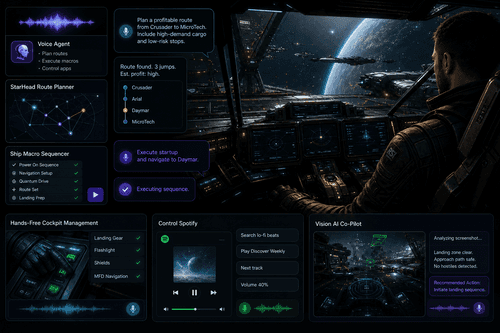
Key Capabilities
Who Uses It
Download the Windows client and start a 7‑day trial. Pick a preset Wingman—ATC or Computer for Star Citizen—or create your own. Record keybindings directly, define macros, and add Instant Activation phrases for frequent actions. Connect Skills and MCP tools, then plug in API keys for services like StarHead, UEXCorp, Spotify, or your preferred AI providers. Optionally run local models via LM Studio or Ollama and local TTS with PocketTTS. Configuration is file-based yet fully editable in the client, with live previews for voices and prompts. Community support and active development help you iterate quickly.
NexusAi: It's like an improved VoiceAttack... very nice.
Getting Started
Wingman AI unifies conversational control and deterministic execution in one client. Dual command paths minimize latency without sacrificing reasoning. Skills and MCP make chat actionable across APIs and devices. Star Citizen presets deliver immediate value, while the open core and swappable STT→LLM→TTS pipeline keep it extensible, private, and future-proof.
Open the tool and review its core product experience.
Create your account or access your existing workspace.
Use your own task to judge speed, quality, and fit.
Check similar AI tools before making a final decision.

Wingman AI
ShipBit GmbH is the team behind Wingman AI, building practical AI tooling for gamers and creators. The open-source Wingman Core fosters a vibrant developer community, while the Windows client emphasizes usability, extensibility, and performance—particularly for Star Citizen—without invasive game hooks or memory access.
Wingman AI is a Windows voice-first client that turns conversation into repeatable actions across any game or application. It combines speech recognition, LLM reasoning, instant phrase triggers, and a deterministic input engine that simulates keystrokes and mouse movement without touching game memory. Users define Commands and macros or choose from preconfigured Wingmen, especially for Star Citizen, with ATC and ship-computer roles plus ready keybindings. Modular Skills and MCP servers connect external services such as Spotify, StarHead, and UEXCorp, while Vision AI analyzes screenshots to inform decisions. The entire STT → LLM → TTS pipeline is swappable: run cloud providers or local stacks like LM Studio, Ollama, and PocketTTS. Multilingual voices and per-wingman context let you craft characters that both talk and act, enabling hands-free control, immersive roleplay, and practical automation beyond simple voice command systems.
Visit Wingman AI
Comments (0)
No Comments Found