Best AI Tools to Watch for Productivity, Research and Creative Work in 2026
A practical ranking-style guide to the AI tools worth watching across productivity, research, writing, coding, search, creative workflows, automation, and local AI workstations in 2026.
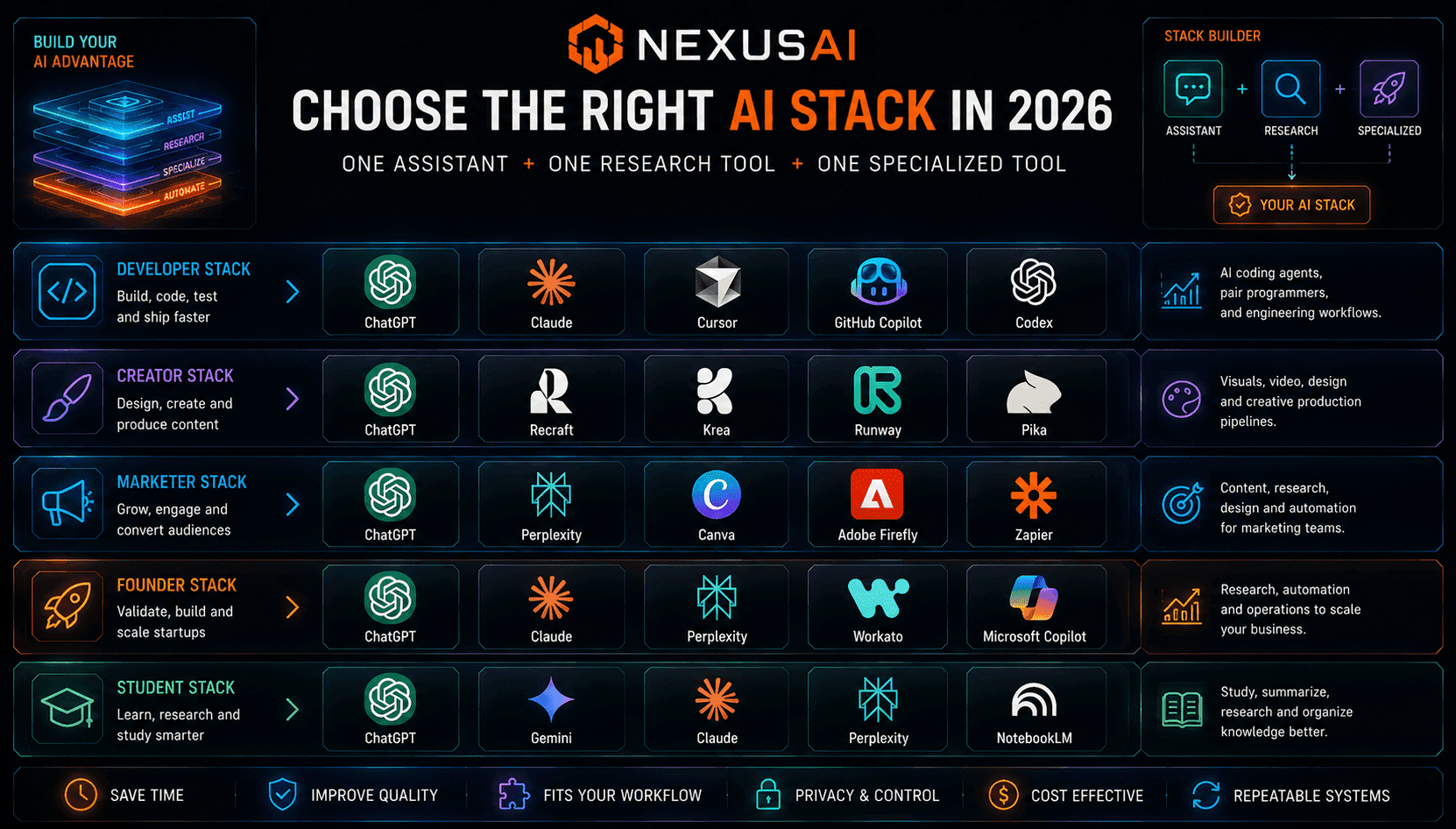
AI BriefThe best AI tools in 2026 are not simply the tools with the strongest models or the loudest launches. They are the tools that fit real workflows: productivity, research, writing, coding, design, search, automation, local AI, and business operations. This expanded ranking helps NexusAI users choose a practical AI stack instead of chasing every new app.
The AI tool market is crowded, but the most useful tools tend to fall into clear workflow categories: general assistants, research assistants, coding agents, creative generation tools, automation platforms, business productivity products, agent skills, and local AI workstations. In 2026, the best choice is rarely one universal tool. The strongest users build a stack around the work they do most often.
Instead of trying every new AI app, users should start with a few high-leverage categories. A general assistant can handle writing, planning and everyday reasoning. A research tool can help with fast information discovery. A coding agent can support software work. A creative tool can produce visual assets. An automation platform can connect workflows. A local AI machine can keep private work closer to the device.
This guide ranks AI tool categories by practical value rather than hype. The goal is to help founders, developers, creators, marketers, students, consultants and business users decide which tools deserve attention, which ones are best for specific workflows, and how to combine them into a repeatable AI productivity system.
The most important shift in 2026 is that AI tools are becoming workflow infrastructure. Chatbots are becoming workspaces. Coding assistants are becoming agents. Creative generators are becoming production pipelines. Search tools are becoming research companions. Automation platforms are becoming AI operations layers. Users who understand these categories will make better tool choices than users who only compare model names.
Key Takeaways
Choose tools by workflow, not hype
The best AI tool depends on whether the user needs writing, coding, research, creative generation, automation, local AI or business support.
General assistants are still the center of the AI stack
ChatGPT, Claude and Gemini remain the best starting points, but specialized tools often win in coding, research, creative work and automation.
Specialized AI tools are becoming workflow infrastructure
AI coding agents, creative platforms, research tools, automation systems and local AI workstations are turning AI from a chat interface into a full productivity stack.
1. Best for general productivity: ChatGPT, Claude and Gemini
ChatGPT, Claude and Gemini remain the core assistants to compare for everyday productivity, writing, planning, summarization, brainstorming and knowledge work. They are the best starting point for most users because they can handle a wide range of tasks before the user needs a specialized tool.
The difference is increasingly about workflow fit. ChatGPT is strong as a broad AI workspace with tools, memory, agents and multimodal features. Claude is especially attractive for long-form writing, analysis, coding support and careful reasoning. Gemini is tightly connected to Google’s search, Workspace and Android ecosystem. Users should test all three against their real tasks rather than choosing only by online rankings.
2. Best for research and search: Perplexity, Gemini, ChatGPT and last30days-skill
Research tools matter because users increasingly need current, source-aware and context-rich answers. Perplexity, Gemini and ChatGPT with web features are useful for fast information discovery, market research, topic exploration, comparison research and early-stage decision support.
A newer category is community-intelligence research. Tools such as last30days-skill point toward a workflow where agents research recent discussions across platforms such as Reddit, X, YouTube, Hacker News, GitHub and the open web. This is useful when the question is not only “what is officially true?” but “what are real users saying right now?”
3. Best for coding workflows: Cursor, GitHub Copilot, Claude Code, Codex and Agent Skills
Coding is one of the strongest AI tool categories because the value is measurable: faster implementation, better debugging, easier refactoring, quicker documentation and more automated testing. Cursor, GitHub Copilot, Claude Code-style workflows, Codex and other coding agents are important tools for developers and technical teams.
The most mature users should not treat coding agents as magic. They should pair them with verification loops, repository instructions, tests, reviews and quality gates. Agent Skills and Loop Engineering are important because they show how developers can make AI coding agents follow senior engineering workflows instead of rushing to incomplete code.
4. Best for creative work: Recraft, Krea, Runway, Pika and Adobe Firefly
Creative AI tools are moving beyond one-off image generation. The best creative tools now support brand assets, design systems, video generation, image editing, style control, motion, thumbnails, ads, product visuals and social content workflows. This makes them highly useful for creators, marketers, designers and startup teams.
Recraft and Krea are especially worth watching for design and visual generation workflows. Runway and Pika remain important for AI video experimentation. Adobe Firefly is relevant for users already inside Adobe’s creative ecosystem. The best tool depends on whether the user needs consistent brand design, fast social content, cinematic video, image editing or professional creative production.
5. Best for business automation: Workato, Microsoft Copilot and AI workflow platforms
Automation is where AI becomes operational. Tools such as Workato and Microsoft Copilot-style enterprise workflows help businesses connect apps, trigger actions, summarize internal information, process repetitive work and build AI-assisted operations across departments.
This category is especially important for teams that already have data spread across email, spreadsheets, CRMs, ticketing tools, finance software, documents and internal systems. A chatbot can help answer questions, but an automation platform can move work through the business. In 2026, this is one of the clearest paths from AI experimentation to measurable ROI.
6. Best for local AI and private workflows: RTX Spark, Ryzen AI Halo and AI PCs
Local AI is becoming more important as users run models, coding agents, creative tools and private assistants on their own machines. NVIDIA RTX Spark, AMD Ryzen AI Halo and the broader AI PC category show that AI workflows are moving from cloud-only services into personal workstations and agent computers.
This category is not for everyone yet, but it matters for developers, creators, researchers and businesses handling sensitive data. Local AI can reduce cloud dependency, improve control over private files, support offline experimentation and make agent workflows faster for certain tasks. The key is software support: models, drivers, frameworks and agent tools must work reliably on the hardware.
How to choose the right AI stack in 2026
The best AI stack usually starts with one general assistant, one research tool and one specialized tool for the user’s main workflow. A developer might choose Claude or ChatGPT plus Cursor and Agent Skills. A marketer might choose ChatGPT plus Perplexity and Recraft. A founder might choose Gemini or ChatGPT plus Workato and a research agent.
Users should evaluate tools by workflow results: time saved, output quality, reliability, privacy, integrations, cost and repeatability. A tool that looks impressive in a demo may not be useful if it does not fit the user’s daily work. The best AI tools are the ones that become part of a repeatable system.
Frequently Asked Questions
Should I use one AI tool or multiple tools?
Most users benefit from using one general assistant plus a few specialized tools. A practical setup might include ChatGPT, Claude or Gemini for general work; Perplexity or Gemini for research; Cursor or Copilot for coding; Recraft or Krea for visuals; and Workato or Microsoft Copilot for automation.
How should beginners choose AI tools?
Beginners should choose based on one clear goal first. If the goal is writing faster, start with a general assistant. If the goal is coding, try a coding assistant. If the goal is social content, test creative tools. If the goal is business efficiency, look at automation platforms.
What is the biggest AI tool trend in 2026?
The biggest trend is workflow specialization. AI tools are no longer only chatbots. They are becoming coding agents, research assistants, design systems, automation platforms, local AI workstations and enterprise productivity layers.
Are specialized AI tools better than ChatGPT, Claude or Gemini?
Specialized tools can outperform general assistants in focused tasks such as coding, video generation, image design, research monitoring or business automation. However, general assistants remain useful as the central workspace for planning, writing, reasoning and coordinating work.

