

NexusAi logo

NexusAi

  • Products
  • Category
  • Prompts
  • Search
  • Insights
  • Pricing
  • Promote
  • Contact
Sign In
NexusAi LogoNexusAi

NexusAI helps you discover, compare, and learn AI tools with ease. From expert insights to training resources, we empower individuals and businesses to harness AI technology for smarter decisions, innovation, and growth.

Useful Links

  • About Us
  • AI Products
  • AI Category
  • AI Prompts
  • AI Search
  • AI Insights

Services & Legal

  • Showcase & Promotion
  • Membership Plans
  • Terms & Conditions
  • Refund Policy
  • Privacy Policy
  • Disclaimer

Contact Us

88 Tribune Street
South Brisbane, QLD, Australia, 4101
Website: www.nexusai-tech.com
Email: info@nexusai-tech.com

© Copyright 2026 NexusAi All Rights Reserved

Developed by DStudio Technology
Home/AI Insight/AI Product News/GPT‑Live-1 Makes ChatGPT Voice a True Multimodal Work Interface
AI Product NewsVoice Agent Update

GPT‑Live-1 Makes ChatGPT Voice a True Multimodal Work Interface

OpenAI’s GPT‑Live‑1 upgrades ChatGPT Voice from a talking chatbot to an interruptible, multimodal work interface that blends speech, web search, memory, images, and streamed text in one thread. Here’s what changed, who benefits, where it still falls short, and how to pilot it responsibly.

NexusAI Research DeskJul 30, 20262.6K views9 min read
GPT‑Live-1 Makes ChatGPT Voice a True Multimodal Work Interface
AI Brief

OpenAI’s GPT‑Live‑1 now powers ChatGPT Voice for paid users (with GPT‑Live‑1 mini for Free), enabling natural interruptions and simultaneous listening/speaking while combining search, memory, images, and streamed text in a single conversation. This moves Voice from novelty to a practical work surface: ask, correct mid‑utterance, and see visual widgets populate results alongside transcripted dialogue. The catch: no video/screen share in this mode, and initial availability excludes Business/Enterprise/Edu workspaces. For operators and builders, the upside is faster task orchestration in dynamic contexts—support desks, field ops, design reviews—without hand‑offs between tools. The next step is disciplined piloting with privacy controls, latency targets, and outcome metrics to prove real workflow ROI.

Premium Partner

Featured AI Partner

Promote your AI Tools

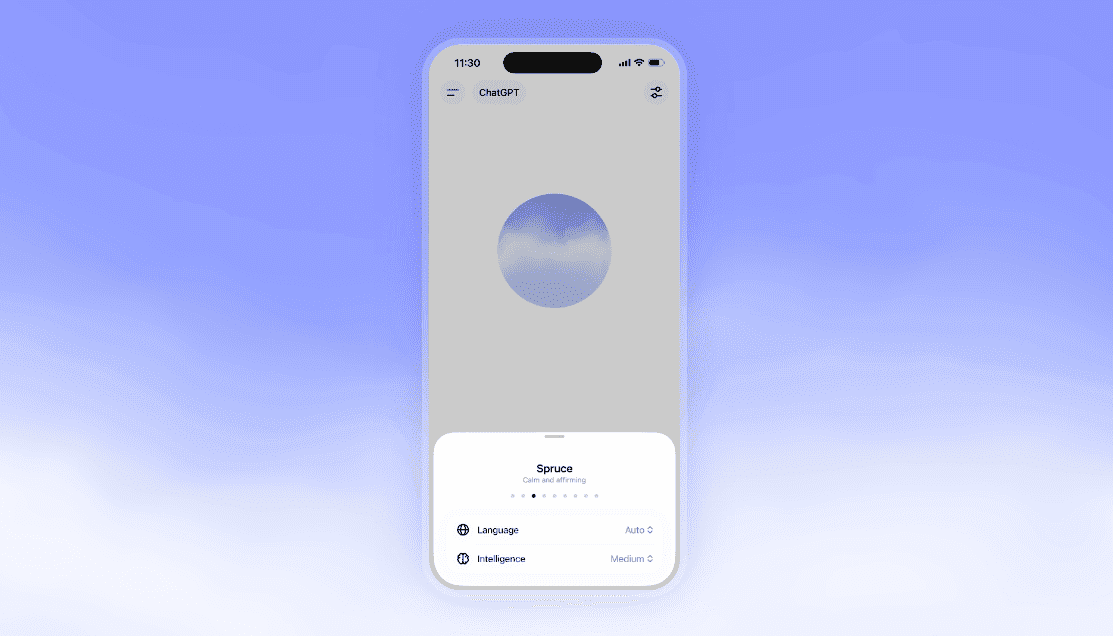
GPT‑Live‑1 reframes ChatGPT Voice as a work interface rather than a voice novelty. The model can listen and speak at the same time, letting you interrupt naturally, redirect, or provide quick clarifications without waiting for turn‑based pauses. Inside a single chat, Voice now coordinates web search, uses memory where enabled, and shows visual widgets for results, while streamed text keeps a readable audit trail. For teams juggling dynamic tasks—triage, research, and drafting—this reduces context switching: you talk, it acts, and the conversation surface stays the source of truth with artifacts you can review, edit, or export.

Practically, this matters because most real‑world work is messy. People change their minds mid‑sentence, need to compare options, and verify facts. A voice agent that tolerates interruptions and blends modalities can gather sources, summarize, and assemble outputs faster than a chat‑only or voice‑only agent. GPT‑Live‑1 pushes more of that orchestration into the conversation itself. The streamed text means output is inspectable, while visual cards minimize cognitive load by surfacing key results or images without bouncing to another app. For complex knowledge tasks and quick decisions, that combination is often more usable than separate voice and search tools.

The rollout splits capability by plan—GPT‑Live‑1 for paid, GPT‑Live‑1 mini for Free—so leaders should anticipate uneven quality across teams and customers. There are also constraints: no video or screen sharing in this mode, and early limitations for Business, Enterprise, and Edu workspaces. Still, pilots can deliver measurable gains in response time, task completion, and user satisfaction if you pair Voice with clear prompts, privacy controls, and fallback paths to text or advanced modes. Treat this as an interaction paradigm shift: from typing instructions to speaking goals, then curating reliable, visualized results in one living thread.

Key Takeaways

Voice Is Now a Work Surface

GPT‑Live‑1 merges speech, search, memory, images, and streamed text into one auditable thread, enabling faster iteration with fewer modality switches.

Pilot Where Interruptions Matter

Start with triage, research, and creative review flows that benefit from mid‑utterance corrections and visual confirmations to validate early ROI.

Guardrails and Metrics First

Define privacy limits for memory, require goal restatements after interruptions, and track latency, corrections, and satisfaction to guide scaling decisions.

What Changed With GPT‑Live‑1 Voice

GPT‑Live‑1 powers natural, interruptible turn‑taking: it listens and speaks concurrently, so you can cut in to correct details, add constraints, or change goals mid‑response. Within the same conversation, Voice now blends web search, memory (when enabled), images, and streamed text. Visual widgets present results—like link previews or image cards—next to the transcript, preserving traceability. Paid plans receive GPT‑Live‑1; Free users get GPT‑Live‑1 mini. It’s shipping across the web app and the mobile apps in supported regions. Notably, this mode doesn’t include video or screen sharing; those remain available in advanced voice experiences for eligible subscribers.

Why This Matters for Operators and Builders

Interruptibility and multimodality are the difference between conversational AI as a demo and AI as a tool. With GPT‑Live‑1, users can refine a query by speaking over the model while it talks, then see corroborating search snippets or images arrive inline. That lowers friction for research, brainstorming, and triage where direction shifts quickly. For frontline teams, it means fewer restarts and less context loss. For builders, the conversational surface becomes a unified state: prompts, retrieved facts, visual summaries, and partial drafts co‑exist. This enables faster iteration, auditable outputs, and better hand‑offs between human and agent without forcing a modality change.

Recommended Pilots and Integration Patterns

Start where interruptions are common and visual confirmations help: support triage, research sprints, vendor or product comparisons, creative reviews, and meeting prep. Pair Voice with memory for stable preferences (tone, style, recurring entities) and use search for fresh facts. Design a short voice rubric: state the task and constraints first, then let the agent narrate its plan while results stream visually for verification. Capture artifacts (summaries, links, images) inside the same thread for easy escalation. Define fallbacks: if the answer requires sensitive data or structured output, switch to text or a non‑voice mode that supports files, approvals, or stricter templates.

Limits, Risks, and Policy Guardrails

Constraints to note: no video or screen sharing in this mode; initial availability excludes Business, Enterprise, and Edu workspaces; and web results can still be wrong or stale. Interruptibility heightens the risk of mid‑task context loss or conflicting instructions, so require the agent to restate the understood goal after any interruption. Enable privacy settings thoughtfully—restrict memory for regulated content and use role‑based guidance to prevent accidental disclosure in shared spaces. Track hallucination‑sensitive tasks with higher scrutiny and keep a human‑in‑the‑loop step for external communications or customer‑facing outputs until quality and compliance thresholds are met.

Success Metrics and an Adoption Checklist

Measure first‑response latency (speech start to first word), task completion rate without re‑prompts, correction count per task, and user satisfaction after 3–5 sessions. Aim for a 20–30% reduction in time‑to‑answer on research queries and higher accuracy on constrained tasks after rubric training. Checklist: define pilot use cases and redlines; enable memory for low‑risk preferences only; provide a two‑minute voice primer for staff; standardize prompts and interruption etiquette; pre‑build reference snippets for common lookups; and implement review gates for outbound materials. Reassess after two weeks to decide on scaling, deeper integrations, or switching specific flows back to text.

Frequently Asked Questions

When should I use GPT‑Live‑1 Voice versus staying in text mode?

Use Voice when you expect frequent interruptions, need quick clarifications, or benefit from visual summaries during exploration. Stay in text for sensitive inputs, structured deliverables, or when files, approvals, or strict templates are required. Provide a clear handoff rule so users can switch modes confidently.

How do I run a 30‑day pilot that proves value?

Pick 2–3 flows (support triage, research, creative review). Create a voice rubric, enable memory for safe preferences, and log metrics: first‑response latency, task completion without re‑prompts, correction count, and CSAT. Hold weekly reviews to refine prompts and guardrails; expand only when accuracy and time savings are sustained.

What data controls reduce risk with Voice and memory?

Segment pilots to low‑risk content, disable memory for regulated data, and add role‑specific guidance. Require the agent to restate goals after interruptions, and keep human review for external outputs. Document retention rules for transcripts and widgets, and audit random samples for accuracy and policy compliance.

#Voice-First UX#Voice Agent Infrastructure#Agentic Browsing#Built-in Browser#Memory Persistence for Agents#Personal Context#Agentic Workflows#Mobile Agents#Mobile AI Workspace#Computer Use (Desktop)#Speech LLMs#Agent Skills#GPT-Live-1#Voice Turn-Taking#Interruptible Voice UX#Multimodal Voice Workflows#ChatGPT Work#Desktop Voice Agents#Real-Time Speech Recognition#Agentic Voice Interfaces#AI Voice Safety

AI Insight Newsletter

Get the latest AI updates, tool news, and insights delivered to your inbox.

No spam. Unsubscribe anytime.
On This Page
1.What Changed With GPT‑Live‑1 Voice2.Why This Matters for Operators and Builders3.Recommended Pilots and Integration Patterns4.Limits, Risks, and Policy Guardrails5.Success Metrics and an Adoption Checklist
Share this article

Related Articles

ZML LLMD Targets Multi-Chip LLM Inference Without Nvidia Lock-In
AI Product News

ZML LLMD Targets Multi-Chip LLM Inference Without Nvidia Lock-In

Jul 9, 2026

Agility Robotics Opens 60,000-Square-Foot Training Facility to Industrialize Humanoids
General AI Industry News

Agility Robotics Opens 60,000-Square-Foot Training Facility to Industrialize Humanoids

Jul 19, 2026

Browser Use Turns Any LLM Into a Web Operator: Architecture, Setup, and Enterprise Limits
AI Product News

Browser Use Turns Any LLM Into a Web Operator: Architecture, Setup, and Enterprise Limits

Jul 16, 2026

Spotify’s New Conversational Assistant Turns Discovery Into Two-Way Personalization
AI Product News

Spotify’s New Conversational Assistant Turns Discovery Into Two-Way Personalization

Jul 15, 2026

NEO’s 25‑DoF Tendon Hands Make Humanoids Read‑Write Instruments
AI Model & Platform Updates

NEO’s 25‑DoF Tendon Hands Make Humanoids Read‑Write Instruments

Jul 15, 2026

Related AI Tools

View All
ChatGPT by OpenAI: The World’s Most Popular Conversational AI

ChatGPT by OpenAI: The World’s Most Popular Conversational AI

Writing & Text AI

Sponsored AI Tools (0)

Promote your AI Tool