NexusAi logo

NexusAi

  • Products
  • Category
  • Prompts
  • Search
  • Insights
  • Pricing
  • Promote
  • Contact
Sign In
NexusAi LogoNexusAi

NexusAI helps you discover, compare, and learn AI tools with ease. From expert insights to training resources, we empower individuals and businesses to harness AI technology for smarter decisions, innovation, and growth.

Useful Links

  • About Us
  • AI Products
  • AI Category
  • AI Prompts
  • AI Search
  • AI Insights

Services & Legal

  • Showcase & Promotion
  • Membership Plans
  • Terms & Conditions
  • Refund Policy
  • Privacy Policy
  • Disclaimer

Contact Us

88 Tribune Street
South Brisbane, QLD, Australia, 4101
Website: www.nexusai-tech.com
Email: info@nexusai-tech.com

© Copyright 2026 NexusAi All Rights Reserved

Developed by DStudio Technology
Home/AI Insight/Best AI Tools & Rankings/This Month’s Top 5 Open-Source AI Tools and Agent Skills on GitHub
Best AI Tools & RankingsGitHub Tools Guide

This Month’s Top 5 Open-Source AI Tools and Agent Skills on GitHub

We tracked GitHub’s fastest-rising AI repos this month and handpicked five open-source tools and agent skills you can deploy today. From multi-provider gateways to Office document control and codebase memory, these projects shorten the path from local testing to production-grade agent workflows.

NexusAI Research DeskJul 29, 20261.6K views9 min read
This Month’s Top 5 Open-Source AI Tools and Agent Skills on GitHub
AI Brief

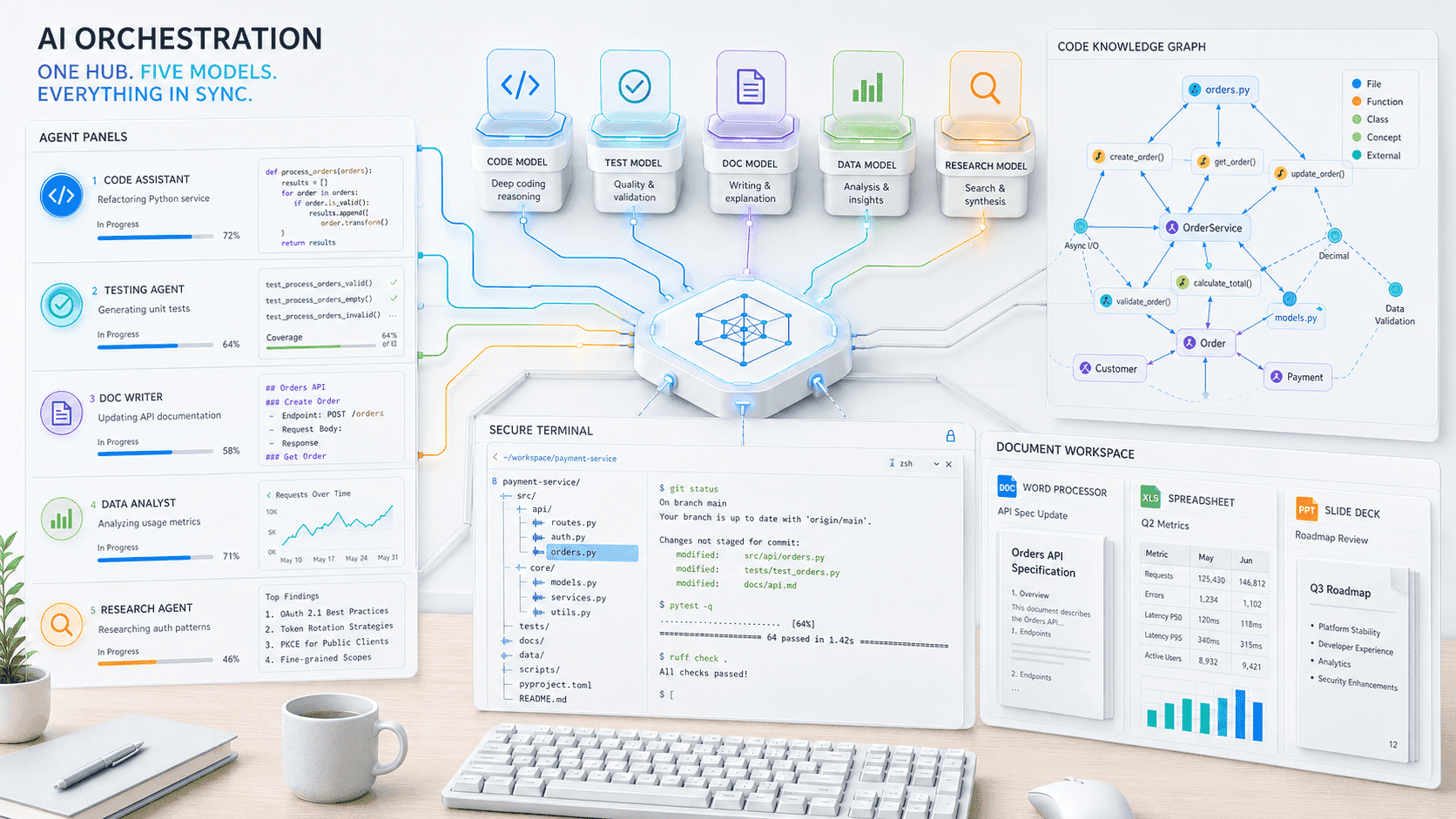
This month’s GitHub surge points to a practical shift: developers want agent stacks that integrate with everyday tools, handle model/provider churn, and keep context grounded in local code and documents. We curated five repos that reduce integration friction: an agent development environment for parallel runs, a multi-provider AI gateway with smart fallback, Office docs control for agent automation, and two MCP servers that bring terminal, filesystem, and code memory to the agent loop. The takeaway for builders and buyers: prioritise components that harden reliability (fallbacks), upgrade context (code memory), and wire agents into existing workflows (Office, shell). Start small with local pilots, measure token and latency budgets, then standardise interfaces before scaling.

Premium Partner

Featured AI Partner

Promote your AI Tools

Open-source AI on GitHub continues to shift from novelty demos to workflow-grade components. This month’s risers concentrate on reliability and integration: routing across multiple model providers, running agents in parallel, and letting agents safely touch real work surfaces like Office files, terminals, and large codebases. For engineering leaders, that cluster matters—production agents break on brittle I/O, missing context, and single-provider dependency. The five picks below close those gaps while remaining lightweight enough to pilot in a day and standardise in a quarter. We focused on repos with accelerating star velocity, clear docs, active maintainers, permissive licenses, and patterns that slot into existing developer workflows.

A common thread is interface stability. Multi-provider gateways abstract model churn; MCP servers stabilise how agents reach local capabilities; and code-intelligence layers prevent context thrash by caching and indexing. Together, they push agent reliability from “works on my laptop” to repeatable runs under token, latency, and permission budgets. If you’re supporting multiple teams, standardising on these interfaces first often delivers more ROI than hunting for a single ‘best’ model. They also create cleaner failure modes—timeouts, tool denial, or fallback paths—so you can observe, test, and remediate without pausing the entire pipeline.

Adoption playbook: begin with a local POC on a narrow, high-friction task (e.g., summarising and revising a proposal while updating related spreadsheets; or triaging a multi-repo issue with code-aware context). Capture baseline metrics: time-to-completion, token/compute spend, handoff counts, and error classes. Add a gateway for resilience, an MCP layer for controlled system access, and a code-memory server to lift context accuracy. Once variance drops and regression tests hold, integrate with CI or document control and set guardrails (rate limits, permissions, cost caps). Move from one team to three, then formalise SLAs and observability.

Key Takeaways

Stabilise Interfaces Before Scaling

Adopt a gateway for model churn, MCP for system access, and a code-memory layer. This trio reduces variance in latency, cost, and correctness, making agent behavior testable and auditable.

Pilot on Real Documents and Repos

Use OfficeCLI and MCP tooling on a narrow, recurring task. Measure tokens, latency, and error classes. Promote to CI or document control only after variance drops and guardrails hold.

Compare Agents in Parallel

Use an ADE to run small deltas side-by-side. Keep the two best variants, rerun after dependency updates, and maintain a living benchmark to prevent silent regressions.

Pick 1: Orca — Parallel Agent Development Environment

Why it matters: parallel execution exposes brittle prompts, flaky tools, and model-specific quirks faster than serial runs. An agent development environment (ADE) like Orca lets you run multiple agent variants side-by-side, swap models, and compare traces. For founders and platform teams, this reduces time-to-fit for a task, encourages evidence-driven prompt changes, and demystifies where failures actually occur—tool calls, retrieval gaps, or model behavior.

How to use it: codify a benchmark task (e.g., refactor-and-test a module or produce a policy brief from mixed sources). Spawn parallel agent configs with small, controlled deltas (model, temperature, tool order). Track success criteria and cost per success. Keep the top two variants and retire the rest; rerun after dependency updates to guard against silent regressions.

Pick 2: OmniRoute — Multi-Provider AI Gateway with Smart Fallback

Why it matters: model quality, latency, and price move weekly. A gateway layer decouples agents from vendor APIs and introduces policy: route by task profile, fail over on timeouts, cap spend by project, and log usage consistently. Teams gain leverage to trial new models without reworking agent code, and legal/compliance gets a single place to enforce regional and data-handling rules.

How to use it: define routing classes—coding, summarisation, extraction, reasoning—and set per-class defaults plus alternates. Turn on token compression or response truncation where acceptable. Instrument with request IDs and structured logs so traces correlate back to user sessions and tasks. Start with read-only workloads, then move higher-risk writes after you validate fallbacks.

Pick 3: OfficeCLI — Give Agents Native Control of Word, Excel, and PowerPoint

Why it matters: most business output still lives in documents and slides. OfficeCLI provides a clean interface for agents to open, inspect, edit, and save files—critical for meeting notes, proposals, budget models, and status packs. Running locally helps with privacy and speed, and it reduces brittle RPA hacks or cloud roundtrips when you only need local automation.

How to use it: start with templated deliverables. Have the agent populate a brief, update linked tables, and enforce style rules. Add a validation step where the agent explains each change and points to inputs used. Gate write permissions per directory and file type; if your org requires audit trails, snapshot diffs after each save for review.

Pick 4: DesktopCommanderMCP — Safe Terminal and Filesystem Control

Why it matters: useful engineering agents need controlled system access—search code, run tests, edit files, inspect logs. MCP (Model Context Protocol) provides a safer contract. DesktopCommanderMCP brings terminal and filesystem operations behind explicit tools with clear prompts, arguments, and outputs. This reduces the risk of free-form shell hallucinations while still enabling meaningful autonomy in local dev loops.

How to use it: whitelist commands and directories; require dry-run outputs before writes. Pair with a diff-review tool so the agent must propose edits and justify them. Add unit-test hooks and fail the task if tests regress. For multi-developer teams, run under a restricted user and rotate permissions via policy files checked into version control.

Pick 5: codebase-memory-mcp — High-Performance Code Intelligence for Agents

Why it matters: most coding agents fail from missing context, not missing models. A code-memory MCP server builds a durable view of the codebase—symbols, dependencies, and relationships—so agents can answer structure questions, navigate call graphs, and propose targeted changes without flooding prompts. This cuts token spend and improves precision for triage, refactors, and cross-repo impact analysis.

How to use it: index the main branch nightly and invalidate on merges. Teach the agent to ask memory-first queries—finding owners, modules, and affected tests—before generating code. Track two numbers: tokens per successful fix and review comments per PR. You should see fewer ‘context-guess’ mistakes and clearer rationales in change descriptions.


Frequently Asked Questions

How should I choose between a multi-provider gateway and direct model APIs?

If you expect provider churn, regional constraints, or variable pricing, start with a gateway to centralise routing, quotas, and observability. Use direct APIs only for stable, specialised tasks where latency budgets are ultra-tight and governance requirements are minimal.

What’s the safest way to let agents edit local files or run commands?

Use MCP servers with explicit tool definitions, directory and command whitelists, and a diff-review step. Run under a restricted user, log every action with request IDs, and require dry runs before writes or deletions. Add unit tests as gates for code edits.

How do I measure ROI on these tools beyond star counts?

Track time-to-completion, tokens per successful task, error classes per 100 runs, and human handoffs. For coding agents, add review comments per PR and rework rate. For document workflows, compare revision cycles and acceptance rates. ROI improves when variance and rework trend down.

#Agent Skills#Reusable AI Skills#Model Context Protocol#mcp server#Computer Use Agents#Computer Use Automation#Office AI Agents#Cybersecurity Code Agents#AI Application Security#Memory Persistence for Agents#Data Plane for Agents#Agent Control Plane#Parallel Tool Calling#Rust Agent Runtime#multi-tool agent integration#codex plugin#Agent Orchestration#AI Gateway Routing#Office Document Automation#Parallel Agent Testing#Codebase Memory#Local AI Workflows#Agent Safety Guardrails

AI Insight Newsletter

Get the latest AI updates, tool news, and insights delivered to your inbox.

No spam. Unsubscribe anytime.
On This Page
1.Pick 1: Orca — Parallel Agent Development Environment2.Pick 2: OmniRoute — Multi-Provider AI Gateway with Smart Fallback3.Pick 3: OfficeCLI — Give Agents Native Control of Word, Excel, and PowerPoint4.Pick 4: DesktopCommanderMCP — Safe Terminal and Filesystem Control5.Pick 5: codebase-memory-mcp — High-Performance Code Intelligence for Agents
Share this article

Related Articles

Pacing the Frontier: Building Brakes for Self‑Improving AI Before It Outpaces Safety
AI Model & Platform Updates

Pacing the Frontier: Building Brakes for Self‑Improving AI Before It Outpaces Safety

Jul 29, 2026

AI-Accelerated Vulnerability Discovery Is Overloading Patch Tuesday Operations
General AI Industry News

AI-Accelerated Vulnerability Discovery Is Overloading Patch Tuesday Operations

Jul 20, 2026

OpenAI’s Small-Business Program Shifts AI Value From Models to Workflows
AI Workflow Guides

OpenAI’s Small-Business Program Shifts AI Value From Models to Workflows

Jul 22, 2026

Clinical AI Adoption Beats Hype: United Imaging’s Measured Rollout Shows What Works
AI Workflow Guides

Clinical AI Adoption Beats Hype: United Imaging’s Measured Rollout Shows What Works

Jul 21, 2026

Omniverse Playbook: Building Simulation‑Ready Worlds for Physical AI
AI Model & Platform Updates

Omniverse Playbook: Building Simulation‑Ready Worlds for Physical AI

Jul 21, 2026

Related AI Tools

View All
AppFlowy: Open-Source AI Workspace for Projects, Wikis, Tasks, and Private Knowledge Management

AppFlowy: Open-Source AI Workspace for Projects, Wikis, Tasks, and Private Knowledge Management

Business Operations AI

Odysseus: Self-Hosted AI Workspace for Local Chat, Agents, Tools & Research

Odysseus: Self-Hosted AI Workspace for Local Chat, Agents, Tools & Research

AI Assistants & Agents

OpenHarness: Open-Source AI Agent Framework & Multi-Agent Orchestration System

OpenHarness: Open-Source AI Agent Framework & Multi-Agent Orchestration System

AI Assistants & Agents

Sponsored AI Tools (0)

Promote your AI Tool