The 5 Best AI Dictation Tools in 2026: Wispr Flow, Aqua Voice, Superwhisper, Willow Voice, and Alter Compared
We road-test five leading voice-first tools—Wispr Flow, Aqua Voice, Superwhisper, Willow Voice, and Alter—across accuracy, writing quality, cross‑app input, privacy, offline support, and workflow fit. Use this buyer’s guide to match strengths and trade‑offs to your job: writing, clinical notes, messaging, or OS‑level automation.
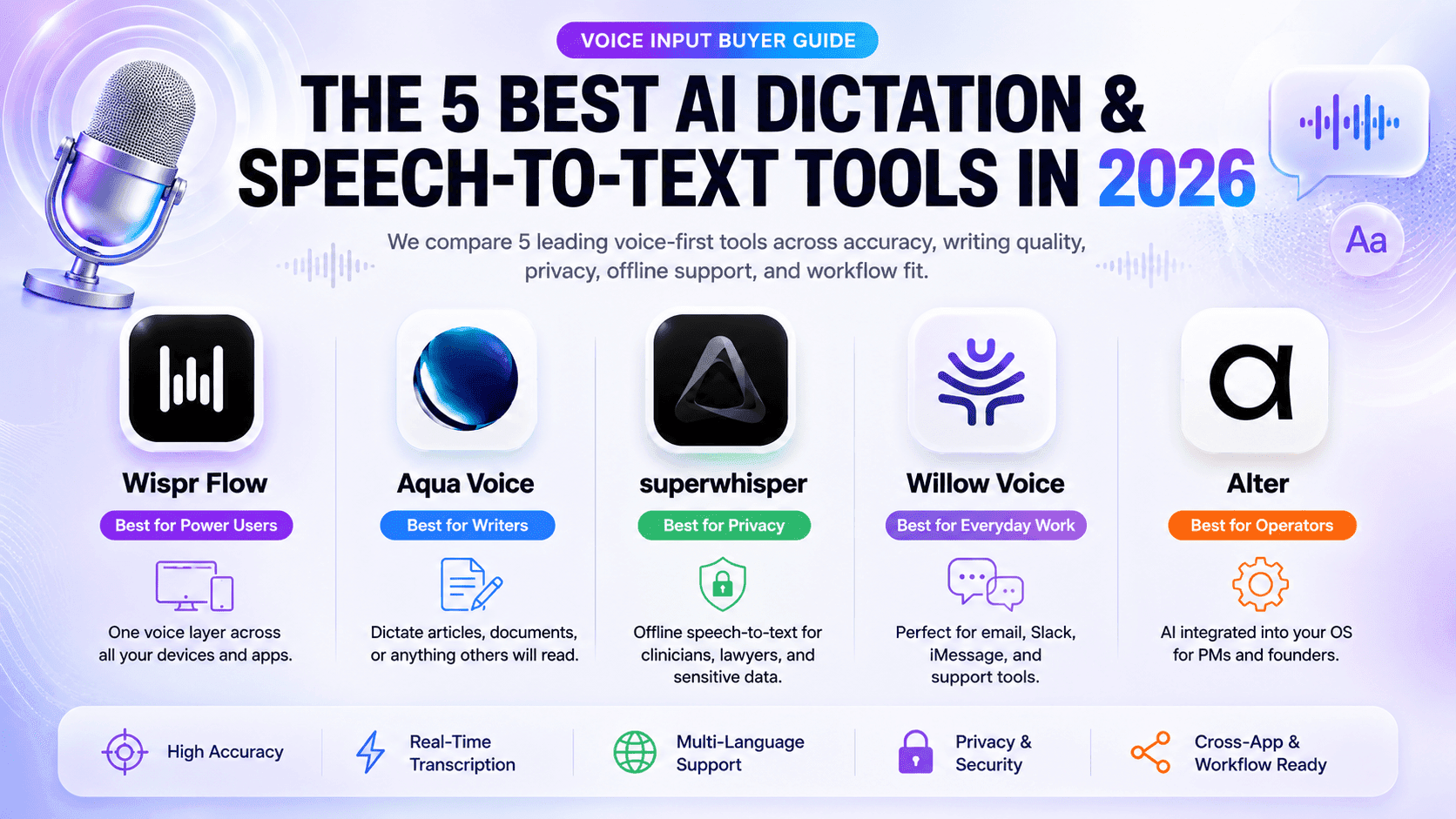
AI BriefVoice input has matured into a true system layer. In 2026, the best tools don’t just transcribe—they write, route, and act across apps. This guide compares Wispr Flow, Aqua Voice, Superwhisper, Willow Voice, and Alter on accuracy, prose quality, cross‑app control, privacy, offline processing, and workflow integration. The takeaway: match the engine to your primary job. If you write long-form, favor tools that produce polished text with minimal edits. If you handle sensitive data, pick local-first. If you live in email and chat, optimize for tone and speed. And if you juggle many apps, consider system-level intelligence that orchestrates tasks, not just text.
AI dictation is no longer a niche accessibility feature—it has become a fast, reliable input layer that slips under everything you do on a computer. The best products press-to-talk anywhere, output clean prose instantly, and understand the context of the app beneath your cursor. In our testing and buyer interviews, the biggest differences in 2026 are not raw word error rate but writing quality, latency under load, system-level context, and how each tool fits daily workflows across writing, messaging, meetings, and AI assistants. That is why the right choice depends less on generic benchmarks and more on where your time actually goes.
Wispr Flow is the cross-platform workhorse, tuned for people who want a consistent voice layer on Mac, Windows, and mobile. Aqua Voice distinguishes itself by producing finished, readable prose that needs less editing, which matters when you dictate entire articles or client-facing documents. Superwhisper wins on privacy with local processing that keeps audio on your device. Willow Voice compresses everyday communication—emails, Slack, iMessage—into clean, on-tone replies. And Alter stretches the category: it is less about dictation and more about a Mac-wide AI that sees your screen, pulls context, and executes steps, shrinking the gap between what you say and what gets done.
Accuracy still matters, but in practice, buyers care about the editing burden and rhythm: do you trust the output enough to stop staring at the cursor? Tools that learn your voice, style, and domain terms reduce fatigue and improve flow. Latency is equally important; a 400–700 ms difference in cleanup or paste time changes whether you’ll actually use dictation for short replies or live note-taking. Privacy posture and offline modes are now table stakes for clinicians, legal teams, and founders working with unreleased information. Finally, workflow integration—templates, tone controls, hotkeys, and routing to AI assistants—decides whether voice becomes a daily habit or a novelty.
Our guidance: map tools to jobs, not hype. Writers and editors should prioritize prose quality and context awareness (Aqua Voice, Wispr Flow). Security-sensitive roles should start with local or offline defaults (Superwhisper) and add voice automation selectively. Communication-heavy teams should optimize for tone and speed (Willow Voice). If your bottleneck is switching between apps and moving data around, a system-level layer that can read and act on windows (Alter) offers the most leverage. Use the testing plan in the sections below to validate accuracy, latency, editing cost, and privacy before you commit team-wide.
Key Takeaways
Match Tool to Primary Workflow
Choose Aqua Voice or Wispr Flow for long-form writing, Superwhisper for local privacy, Willow Voice for high‑volume messaging, and Alter when orchestration across apps is your real bottleneck.
Test What You’ll Actually Do
Benchmark latency, edits per 100 words, and tone accuracy across your real apps. Include a noisy environment test and a live video call to surface performance cliffs before rollout.
Privacy Settings First, Not Last
Set retention, local/offline modes, and redaction policies before pilots. If audio must stay on-device, start with local-first and add cloud features only where benefits are clear.
Accuracy and Writing Quality: What ‘Good’ Looks Like in 2026
Accuracy splits into two layers: literal transcription and editorial cleanup. Wispr Flow and Aqua Voice both handle punctuation and capitalization reliably, but Aqua Voice consistently outputs finished, rhythmically sound prose suitable for publication with minimal edits—ideal for long-form. Wispr Flow’s strength is adaptive style and consistent accuracy across devices, which helps if you bounce between desktop and mobile. Superwhisper’s local models are highly accurate for general dictation but deliberately conservative in rewriting; expect clean text that reads like faithful speech, not an edited article. Willow Voice leans on tone and formatting for short replies. Alter is not optimized for dictation prose; its value is orchestration on top of good-enough voice input.
How to test: dictate a 400-word memo and a 12-sentence email thread. Track total edits per 100 words, time-to-send, and terminology handling. Include domain terms (e.g., medical abbreviations, product names). For each tool, capture average latency from push-to-talk release to paste, and rate perceived “trust”—how often you re-read before sending. Favor tools that reduce editing by 30–50% over baseline typing for your content type.
Cross‑App Voice Input and System Context
The strongest adoption patterns come from tools that feel native everywhere you type. Wispr Flow’s system-wide hotkey and cross-platform coverage make it easy to standardize voice input across email, docs, IDEs, and chat. Willow Voice’s iOS keyboard expands that mobility on phones. Aqua Voice excels inside its drafting environment but is more specialized for long-form sessions. Superwhisper is a dependable Mac utility—press a key, talk, paste—great for repeated snippets during clinical documentation or research notes. Alter is different: it runs as a Mac-level assistant with window awareness, letting you reference open tabs, files, or screenshots and route actions, which can replace multiple micro-steps after dictation.
What to look for: low-latency hotkeys, cursor-aware paste that respects app formatting, and options for inline vs. clipboard paste. Evaluate whether the tool respects your editor’s markdown, bulleting, and code blocks. For system-level assistants, test whether window context improves task completion (e.g., “summarize this PDF then draft an email to the author”) versus pure transcription speed. The winner is the tool you forget you’re using because it blends into your OS muscle memory.
Privacy, Offline, and Compliance Posture
For healthcare, legal, and founders handling unreleased plans, local or offline modes can be non-negotiable. Superwhisper’s on-device transcription keeps audio on your Mac, reducing exposure and simplifying approvals. Willow Voice and Wispr Flow provide privacy-friendly defaults and controls that minimize data retention, while Aqua Voice prioritizes cloud processing in exchange for sophisticated rewriting. Alter offers an assistant model that can run local or route to hosted models depending on task demands. Your policy choice is straightforward: if audio must never leave the device, start with local-first; otherwise optimize for prose quality and latency, with strict opt-out and logging controls.
Implementation notes: document default data paths, audit retention settings, and ensure hotkeys don’t inadvertently capture protected content during screen sharing. Pair local dictation with endpoint encryption and microphone privacy indicators. If you need medical or legal templates, verify that the tool supports custom vocabularies or post-processing macros for common phrases, ICD/CPT codes, and disclaimer text. Finally, test accuracy with masked PII to avoid seeding models with sensitive data during trials.
Workflow Integration and Buyer Fit
Writers and editors: Aqua Voice is the best bet when you want prose that sounds edited, with Wispr Flow close behind if cross-device coverage matters more than final polish. Clinicians, lawyers, and privacy-first teams: Superwhisper’s local processing and boring reliability make it easy to adopt as a daily utility. Communication-heavy roles: Willow Voice speeds up replies with on-tone, properly formatted output and a strong mobile story via its keyboard. Operators and founders running multi-app workflows: Alter’s system context and action capabilities compress task chains (collect, draft, route) in a way pure dictation cannot match. If you’re building an AI-first stack, consider pairing a dictation utility with a screen-aware assistant for maximum leverage.
Integration checklist: confirm robust hotkeys, template support (sign-offs, meeting notes, SOAP notes), tone switches (formal, friendly, concise), and routing to your AI assistant of choice. Evaluate whether team management (seats, policies) and analytics (usage, latency) exist for fleet rollouts. For hybrid environments, prioritize tools that behave identically on macOS, Windows, and iOS to minimize training and support burden.
Implementation Pitfalls: Latency, Drift, and Editing Overhead
Two traps derail rollouts: latency spikes and style drift. A tool that averages 300 ms but spikes to 1.2 s under CPU load will feel unreliable in meetings. Test under realistic conditions—video call active, multiple tabs, and background apps. Style drift appears when models over-smooth informal chat or under-format business writing; build sample sets per channel (email, tickets, docs) and score edit distance to a house style. Microphone quality matters more than you think: use a directional USB mic or modern earbuds, reduce room echo, and enable noise suppression where available.
Pricing can mislead. Subscriptions often buy faster inference and continuous improvements; local-first one-time licenses minimize exposure and long-term cost. Compute a true total cost of ownership: license + average minutes/day × editing time × hourly rate. The right choice is the one that reliably reduces edits and context switching—not the one with the lowest sticker price.
Frequently Asked Questions
How should I fairly compare dictation accuracy across these tools?
Create a 10–12 minute script mixing conversational speech, domain terms, and numbers. Record once with a quality mic, then feed identical audio to each tool (or live-dictate in a controlled quiet room). Score edits per 100 words and time-to-ready-text, not just raw error rate.
What mic and setup deliver the biggest gains for dictation quality?
Use a cardioid USB mic or high-quality earbuds with noise suppression. Sit 6–10 inches from the mic, reduce room echo with soft furnishings, and avoid typing during dictation. Set push-to-talk, disable aggressive auto-correct, and keep a domain glossary for consistent capitalization and terms.
When is a system-level assistant like Alter better than a pure dictation app?
Choose a system assistant when the value is executing multi-step tasks after speech—collecting context from open apps, summarizing files, and drafting or sending messages—so you avoid app switching. If your work is mostly turning speech into text for documents, a focused dictation app is simpler.

